What Is Bitget Unified Trading Account (UTA)? Trade More Efficiently With One Account
Key Takeaways
-
Bitget Unified Trading Account, or Bitget UTA, brings multiple trading products into one account: Users can manage supported Spot, Spot Margin, USDT-M Futures, USDC-M Futures, and Coin-M Futures without repeatedly transferring funds between separate accounts.
-
Bitget UTA offers four account modes for different trading needs: Isolated Margin Mode focuses on position-level risk separation, Basic Mode supports stablecoin-based margin, Advanced Mode enables broader multi-asset collateral, and Delta Neutral Mode supports eligible hedging and arbitrage strategies.
-
Eligible assets can be used more efficiently as collateral: Under supported modes, assets such as BTC, ETH, stablecoins, selected cryptocurrencies, and rTokens can contribute margin value based on their applicable collateral ratios.
-
Bitget UTA improves capital efficiency across products: Shared margin, cross-product PnL offset, auto-borrow, and auto-repay help users make better use of their assets, while shared collateral also means losses and liabilities in one product can affect the overall account.
What Is Bitget Unified Trading Account (UTA)?
Bitget Unified Trading Account, or Bitget UTA, is an integrated account system that allows users to manage supported Spot, Spot Margin, and Futures products through one account and a shared asset pool.
In a classic trading account, Spot, Margin, and Futures balances are managed separately. Users may need to transfer assets between product accounts before placing trades or adding margin. This can leave part of their portfolio unused and make asset management more complicated.
Bitget UTA brings eligible assets, positions, margin, liabilities, profits, and losses into one unified framework. Depending on the selected account mode, users can access Spot, Spot Margin, USDT-M Futures, USDC-M Futures, and Coin-M Futures without repeatedly moving funds between separate accounts.
For example, a user may hold BTC in Spot while trading a USDT-M Futures position. Under a classic account structure, the user may need to sell BTC for USDT or transfer additional funds into the Futures account to add margin. With Bitget UTA Advanced Mode, eligible BTC holdings can contribute collateral value based on the applicable collateral ratio, allowing the user to support the Futures position without first selling the BTC.
By combining supported products within one account, Bitget UTA makes it easier to manage multi-product strategies and use eligible assets more efficiently. Account equity and risk are calculated at the overall account level, while the available products, collateral options, and margin functions depend on the selected UTA mode.
Learn more: Overview of Bitget’s Unified Trading Account
How Does Bitget Unified Trading Account (UTA) Work?
Bitget UTA brings eligible assets, positions, margin, liabilities, profits, losses, and account risk into one unified system. Instead of managing separate balances for each trading product, users can access supported Spot, Margin, and Futures markets through the same account framework.
Assets Are Managed Through One Account
After upgrading to Bitget UTA, eligible balances are consolidated within the unified account. Users can trade supported products without repeatedly transferring funds between separate Spot, Margin, and Futures accounts.
The exact products available depend on the selected Bitget UTA mode.
Eligible Assets Are Converted Into USD Value
Bitget UTA calculates the USD-equivalent value of eligible assets to determine account equity, available margin, liabilities, and overall risk.
The calculation considers:
-
Eligible asset balances
-
Current asset prices
-
Unrealized profits and losses
-
Outstanding liabilities
-
Accrued interest
-
Maintenance margin requirements
-
Applicable collateral ratios
Assets that are not eligible as margin may remain in the account, but they do not contribute to usable collateral.
Supported Assets Can Contribute Margin
Under supported modes, particularly Advanced Mode, multiple eligible assets can be used as collateral. These may include USDT, USDC, BTC, ETH, selected cryptocurrencies, and supported rTokens.
However, the full market value of an asset is not always counted as margin. Each eligible asset contributes according to its applicable collateral ratio, which may vary based on liquidity, volatility, market depth, holding size, and current risk conditions.
Profits and Losses Can Offset Across Products
Bitget UTA calculates supported profits and losses at the account level. A profit from one product can help offset a loss from another when account equity and margin risk are calculated.
For example, an unrealized profit from a Spot position may partially offset an unrealized loss from a Futures position. The loss still exists, but the unified calculation allows the account’s overall equity to be used more efficiently.
Risk Is Managed at the Account Level
For cross-margin products, Bitget UTA evaluates the account as a whole rather than looking only at one position or product balance.
Changes in collateral prices, unrealized PnL, liabilities, interest, maintenance margin, and open orders can all affect the account’s risk level. This can improve capital efficiency, but it also means a large loss in one product may reduce the collateral available to support other cross-margin positions.
Bitget Unified Trading Account (UTA) vs. Classic Account
The main difference between Bitget UTA and a classic account is how assets, margin, profits, losses, and risk are managed.
In a classic account, Spot, Margin, and Futures balances are separated. Users may need to transfer funds manually between product accounts before opening a position, adding margin, or switching between products. Each product also has its own balance and risk calculation.
Bitget UTA connects supported products within one account. Eligible assets can contribute margin across supported markets, while profits, losses, liabilities, and account risk are calculated through a unified framework.
| Feature |
Classic Account |
Bitget UTA |
| Account structure |
Separate Spot, Margin, and Futures accounts |
One unified account with a shared asset pool |
| Fund transfers |
Often required between products |
Generally reduced across supported products |
| Margin assets |
Usually limited to product-specific assets |
Multiple eligible assets can contribute margin |
| PnL calculation |
Calculated separately by product |
PnL can offset across supported products |
| Borrowing |
Usually managed separately |
Auto-borrow and auto-repay are supported |
| Risk management |
Evaluated by individual product |
Evaluated at the overall account level |
| Capital efficiency |
Some assets may remain idle |
Eligible assets can support multiple activities |
| Liquidation |
Often linked to individual positions |
Cross-margin risk depends on the account margin rate |
For example, a user trading USDT-M Futures in a classic account typically needs USDT in the Futures account. If the user mainly holds BTC in Spot, they may need to sell part of the BTC or transfer additional USDT before adding margin.
Under UTA Advanced Mode, eligible BTC holdings can contribute collateral value based on the applicable collateral ratio. This allows the user to support the Futures position without selling the BTC first.
UTA can therefore reduce operational friction and improve the use of available capital. However, shared margin also connects risk across products. A large loss in one cross-margin position may reduce the collateral available to support other positions in the account.
Advantages of Bitget Unified Trading Account (UTA)
Bitget UTA is designed to reduce account fragmentation and help users use their assets more efficiently across supported trading products.
Unified Asset Management
UTA brings supported Spot, Spot Margin, and Futures assets into one account. Users can view eligible balances, positions, liabilities, collateral value, and overall risk through one unified framework instead of managing several separate product accounts.
Fewer Internal Transfers
In a classic account, users may need to move assets between Spot, Margin, and Futures before placing trades or adding margin.
UTA reduces this need by allowing supported products to use the same eligible asset pool. This can simplify multi-product trading and make capital easier to manage.
Improved Capital Efficiency
Eligible assets can contribute collateral value while remaining in the user’s portfolio. This allows users to make better use of supported holdings without first converting or transferring them between separate accounts.
Bitget UTA supports more than 370 margin assets, including 100 rTokens linked to U.S. stocks and ETFs. This gives users a broader range of eligible assets that can be used across supported trading and margin scenarios.
Cross-Product PnL Offset
Profits and losses across supported products can be considered together when UTA calculates account equity and margin risk.
This allows the account’s overall equity to be used more efficiently. However, PnL offset does not remove losses or guarantee that the account will avoid liquidation.
Multi-Asset Collateral
Under Advanced Mode, users can enable multiple eligible assets as collateral. These may include USDT, USDC, BTC, ETH, selected cryptocurrencies, and supported rTokens.
Each asset contributes margin according to its applicable collateral ratio. The ratio may vary based on liquidity, volatility, market depth, holding size, and current risk conditions.
Auto-Borrow and Auto-Repay
UTA can automatically borrow an asset when a supported transaction requires more of that asset than the account currently holds, subject to available collateral and borrowing limits.
When the borrowed asset later becomes available, the system can use it to repay the liability automatically.
This reduces the need to borrow and repay manually, but borrowing may generate interest, reduce available margin, and increase liquidation risk.
Support for More Trading Strategies
By connecting supported products and collateral within one account, UTA can support a wider range of trading and portfolio-management strategies, including:
-
Spot and Futures hedging
-
Funding-rate arbitrage
-
Basis trading
-
Multi-asset collateral management
-
Crypto and rToken portfolio strategies
-
Delta-neutral trading
-
API-based and institutional trading
UTA does not execute these strategies automatically. It provides the account infrastructure that helps users manage eligible assets, positions, and risks more efficiently.
Bitget Unified Trading Account (UTA) Account Modes
Bitget UTA offers four account modes for different products, collateral needs, and risk preferences: Isolated Margin Mode, Basic Mode, Advanced Mode, and Delta Neutral Mode.
| Account Mode |
Main Purpose |
Supported Products |
Margin and Collateral Structure |
| Isolated Margin Mode |
Separate the risk of individual Futures positions |
Spot and isolated USDT-M, USDC-M, and Coin-M Futures |
No unified collateral sharing |
| Basic Mode |
Share stablecoin margin across supported Futures products |
Spot, USDT-M Futures, and USDC-M Futures |
USDT and USDC share one margin pool |
| Advanced Mode |
Use multiple eligible assets across Spot, Margin, and Futures |
Spot, Spot Margin, USDT-M, USDC-M, and Coin-M Futures |
Configurable multi-asset collateral |
| Delta Neutral Mode |
Support hedging, arbitrage, and market-neutral strategies |
Spot, cross-margin Spot Margin, and cross-margin Futures |
All supported margin assets are enabled automatically |
Isolated Margin Mode
Isolated Margin Mode keeps the margin and risk of each Futures position separate. A loss in one isolated position does not automatically use the margin allocated to another isolated position.
This mode supports:
-
Spot
-
Isolated USDT-M Futures
-
Isolated USDC-M Futures
-
Isolated Coin-M Futures
Unified collateral settings and cross-product margin sharing are not available. This mode is suitable for users who prefer clearer position-level risk separation.
Basic Mode
Basic Mode is designed for users who mainly trade stablecoin-settled Futures.
This mode supports:
-
Spot
-
USDT-M Futures under cross or isolated margin
-
USDC-M Futures under cross or isolated margin
USDT and USDC share one stablecoin margin pool. Other cryptocurrencies and rTokens cannot be enabled as collateral, while Spot Margin and Coin-M Futures are not supported.
Basic Mode is suitable for users who want to use USDT and USDC more efficiently without managing a broader multi-asset collateral pool.
Advanced Mode
Advanced Mode provides the broadest product coverage and the highest level of capital flexibility.
This mode supports:
-
Spot
-
Spot Margin
-
USDT-M Futures under cross or isolated margin
-
USDC-M Futures under cross or isolated margin
-
Coin-M Futures under cross or isolated margin
Users can enable eligible assets as collateral, including stablecoins, cryptocurrencies, and supported rTokens. Each asset contributes margin value according to its applicable collateral ratio.
Advanced Mode is suitable for multi-asset traders, portfolio hedgers, rToken users, and users who trade across several Spot, Margin, and Futures markets.
Delta Neutral Mode
Delta Neutral Mode is designed for hedging, arbitrage, and market-neutral strategies.
This mode supports:
-
Spot
-
Spot Margin under cross margin
-
USDT-M Futures under cross margin
-
USDC-M Futures under cross margin
-
Coin-M Futures under cross margin
All supported margin assets are enabled as collateral automatically, and users cannot adjust collateral settings manually. Only cross-margin products are supported.
Qualifying hedged Futures positions can receive lower priority in the Auto-Deleveraging, or ADL, queue. To qualify:
-
The account-level delta equity ratio must be 20% or lower.
-
The asset-level net Futures position ratio must be 5% or lower.
-
The Spot and Futures positions must use the same underlying asset.
-
The Futures position must use cross margin.
Delta Neutral Mode does not change margin calculations or liquidation rules, and it does not guarantee protection from ADL. Live access may also depend on account eligibility or whitelisting.
How Margin and Collateral Work in Bitget Unified Trading Account (UTA)
Bitget UTA distinguishes between an asset’s market value and the amount of margin it can contribute to the account.
Under Advanced Mode, each eligible asset is assigned a collateral ratio. This ratio determines how much of the asset’s USD value can be counted as effective collateral.
Effective collateral value = Asset USD value × Applicable collateral ratio
For example, if an eligible asset is worth $10,000 and has an 80% collateral ratio, it can contribute $8,000 in effective collateral value before other account-level adjustments.
$10,000 × 80% = $8,000
The actual collateral value may also depend on the asset, holding size, collateral tier, and current risk parameters.
Account Equity
Account equity represents the combined USD value of eligible assets in the unified account.
Account equity = Σ (Coin equity × Coin USD price)
For each eligible asset:
Coin equity = Balance + Frozen margin + Unrealized PnL
Account equity changes as asset prices, open positions, unrealized profits and losses, borrowing liabilities, and interest change.
Account Margin Rate
For cross-margin products, the margin rate reflects the relationship between the account’s risk requirements and its total equity.
Margin rate = (Maintenance margin + Estimated partial-liquidation fees) ÷ Account equity
Both open positions and pending orders may increase maintenance margin requirements. As the margin rate rises, the account moves closer to partial liquidation.
Why Collateral Ratios Differ
Collateral ratios vary because different assets carry different levels of market and liquidity risk.
Factors may include:
-
Asset liquidity
-
Price volatility
-
Market depth
-
Holding size
-
Collateral concentration
-
Overall market conditions
Highly liquid assets may receive higher collateral ratios, while more volatile or less liquid assets may receive lower ratios.
Collateral ratios may also decrease in tiers as the amount of one asset held as collateral increases. This helps limit the risk created by excessive concentration in a single asset.
How Can rTokens Be Used With Bitget Unified Trading Account (UTA)?
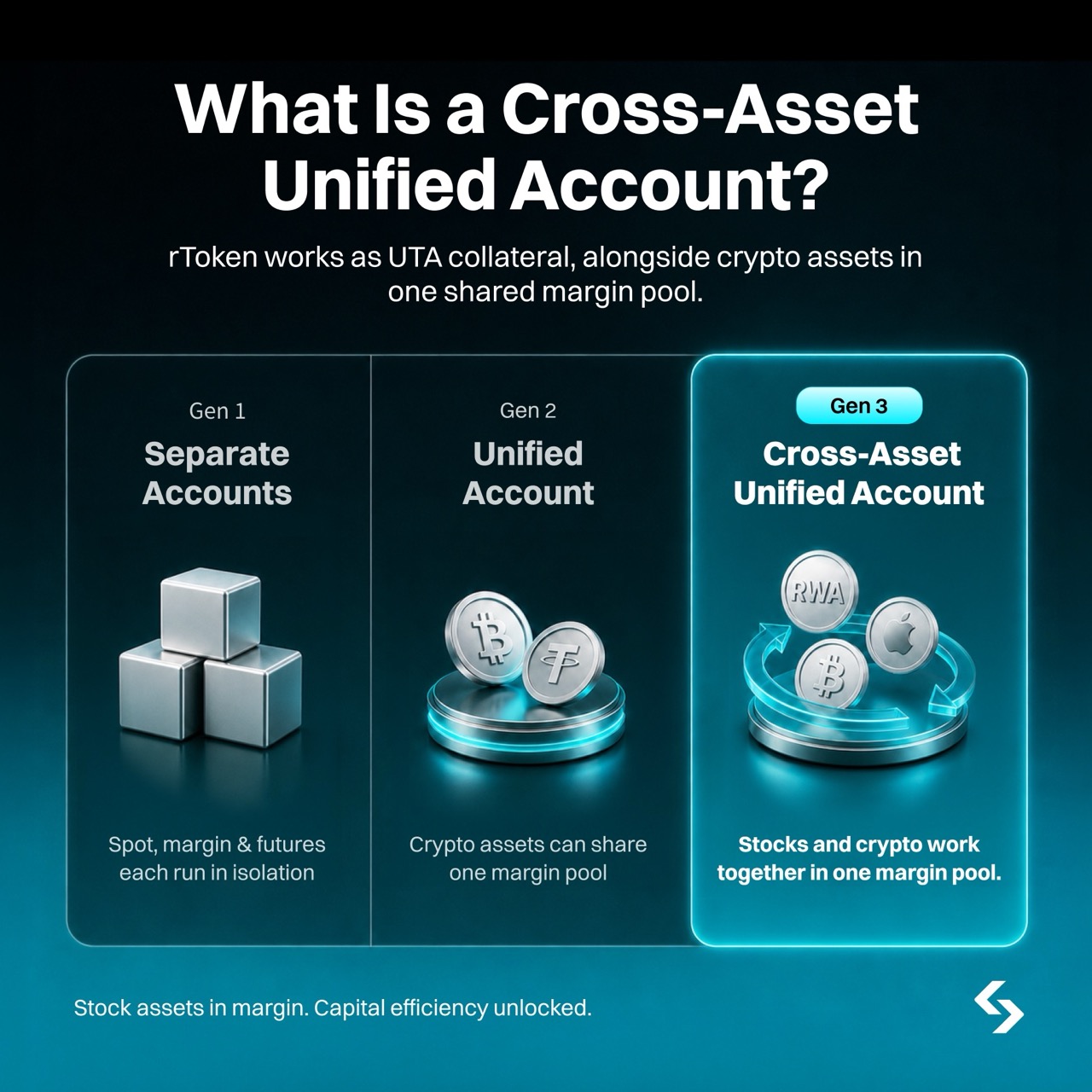
Bitget rTokens are tokenized assets issued through Reality Protocol that provide economic exposure to selected U.S. stocks and ETFs. Supported assets include rAAPL, rAMZN, rMETA, rTSLA, rGOOGL, rNVDA, rMSFT, rQQQ, rSPY, and others.
Under UTA Advanced Mode, eligible rTokens can be enabled as collateral and used across supported margin scenarios. This allows users to:
-
Maintain exposure to selected U.S. stocks and ETFs
-
Contribute margin value to the unified account
-
Support eligible Futures and Margin positions without selling the rTokens first
-
Use supported rTokens as collateral for borrowing
Bitget UTA supports 100 rTokens as margin assets as part of a broader pool of more than 370 supported margin assets.
Eligible rTokens can have collateral ratios of up to 95%, depending on the asset and holding size. Collateral ratios may decrease in tiers as the amount of a single rToken held as collateral increases.
Borrowing rates are floating and updated hourly based on market supply and demand. Users should monitor the applicable collateral ratio, borrowing rate, and account margin level before using rTokens as collateral.
Using rTokens as margin improves capital flexibility, but it also creates combined exposure. If the value of the rToken falls while the position it supports also moves against the user, both collateral value and account equity may decline at the same time.
Learn more: What Is Bitget rToken? A New Way to Access U.S. Stocks with USDT
How Does Liquidation Work Under Bitget Unified Trading Account (UTA)?
Under UTA cross margin, liquidation risk is assessed at the account level rather than through a single fixed liquidation price for each position.
The account margin rate changes as collateral prices, unrealized profits and losses, liabilities, borrowing interest, maintenance margin, and open orders change. When the margin rate reaches 100% or higher, the account enters partial liquidation.
Partial Liquidation
Partial liquidation reduces risk in stages instead of closing every position immediately. The system may reduce positions, cancel orders, or repay liabilities to lower the account margin rate and restore sufficient collateral.
Because multiple assets and positions share the same collateral pool, liquidation in UTA can affect more than one trading product.
Why There May Be No Fixed Liquidation Price
In a classic isolated Futures position, users can often monitor an estimated liquidation price for that specific position.
Under UTA cross margin, the liquidation threshold changes with the overall account. A profit in one product may improve account equity, while a loss, new liability, interest charge, or decline in collateral value may move the account closer to liquidation.
As a result, a cross-margin position may not have one fixed liquidation price.
Factors That Affect Liquidation Risk
Users should monitor:
-
Account margin rate
-
Maintenance margin requirements
-
Unrealized profits and losses
-
Collateral prices and ratios
-
Outstanding loans and liabilities
-
Accrued borrowing interest
-
Open orders
-
Exposure to volatile assets
-
Correlation between collateral and open positions
UTA can improve capital efficiency, but shared margin also connects risk across the account. A large loss in one product may reduce the collateral available to support other positions.
Who Is Bitget Unified Trading Account (UTA)? Suitable For?
Bitget UTA is designed for users who trade across multiple products, manage several assets, or want to use eligible capital more efficiently.
Multi-Product Traders
Users who trade Spot, Spot Margin, and Futures can manage supported products through one account instead of moving funds between separate balances.
Multi-Asset Futures Traders
Advanced Mode allows eligible cryptocurrencies, stablecoins, and supported rTokens to contribute margin value across USDT-M, USDC-M, and Coin-M Futures.
Portfolio Hedgers
Users can manage Spot holdings and offsetting Futures positions within the same account framework, making it easier to monitor overall exposure and account risk.
rToken Users
Eligible rTokens can maintain stock-linked exposure while also contributing collateral value across supported trading and borrowing scenarios.
Arbitrage and Quantitative Traders
UTA supports funding-rate arbitrage, basis trading, cross-market hedging, delta-neutral strategies, and API-based trading through a shared account structure.
Institutional Users
Eligible institutions can use general or virtual UTA sub-accounts, configure API keys, and separate trading permissions across teams or strategies.
Custodial and funding sub-accounts are not supported under unified trading mode, and some institutional features may require whitelisting.
How to Upgrade to Bitget Unified Trading Account (UTA)
Users can upgrade to Bitget UTA through the Bitget app or website. Before starting, the account must meet the displayed eligibility requirements.
Upgrade Through the Bitget App
1. Open the Bitget app.
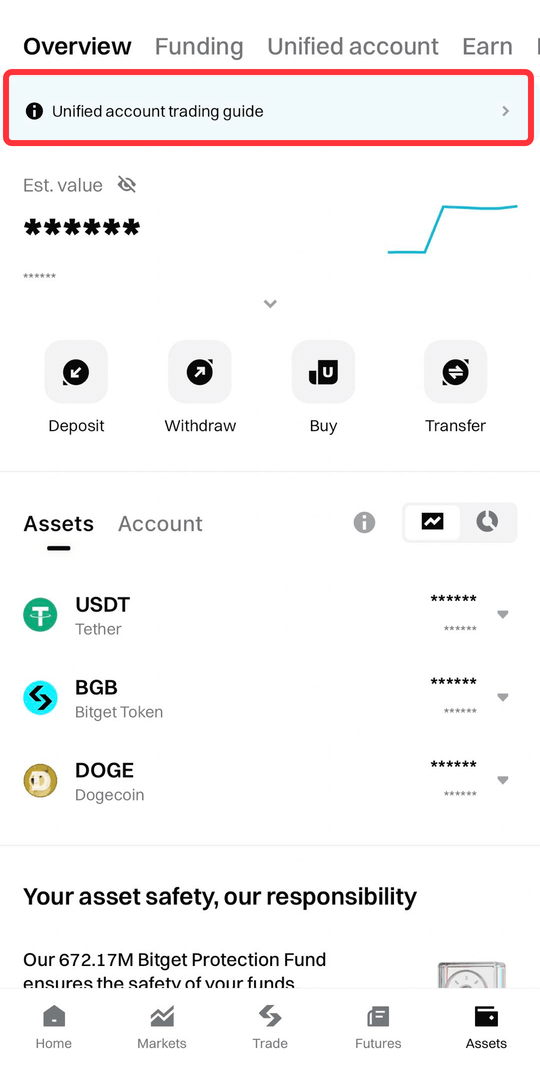
2. Go to Assets.
3. Select Upgrade to Unified Trading Account.
4. Review the eligibility requirements.
5. Complete any required account adjustments.
6. Choose the preferred account mode.
7. Confirm the upgrade.
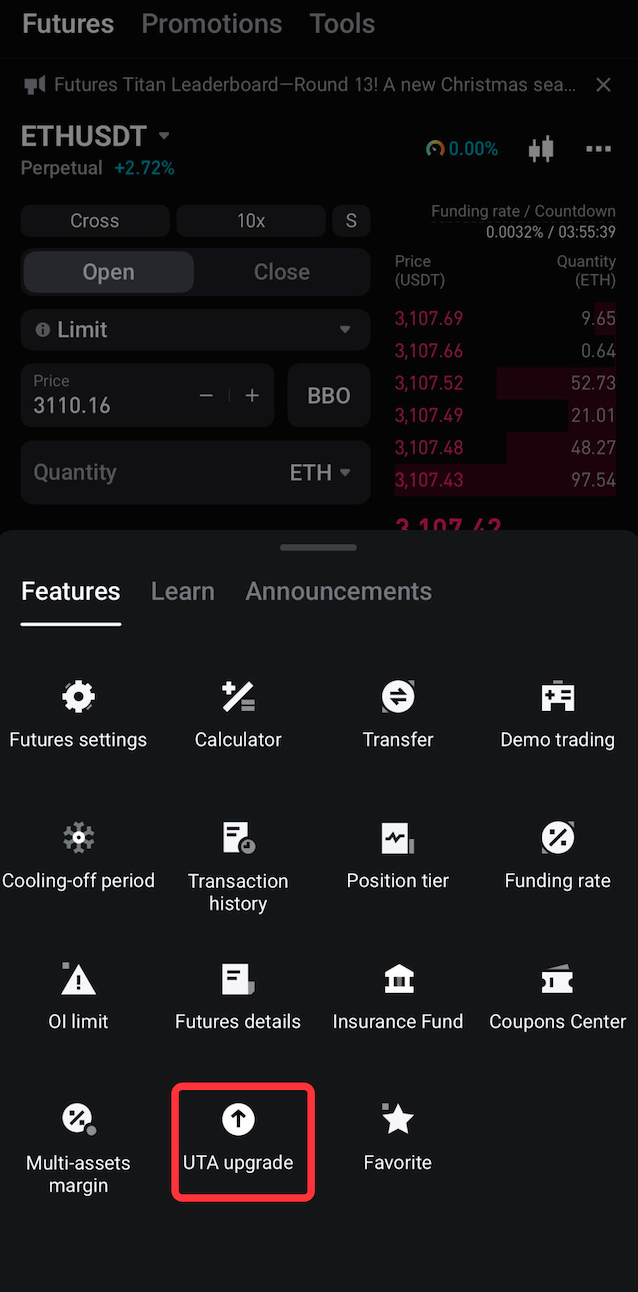
Users can also open a Spot, Margin, or Futures trading page, tap the menu icon, and select UTA Upgrade.
Upgrade Through the Bitget Website
1. Log in to Bitget.
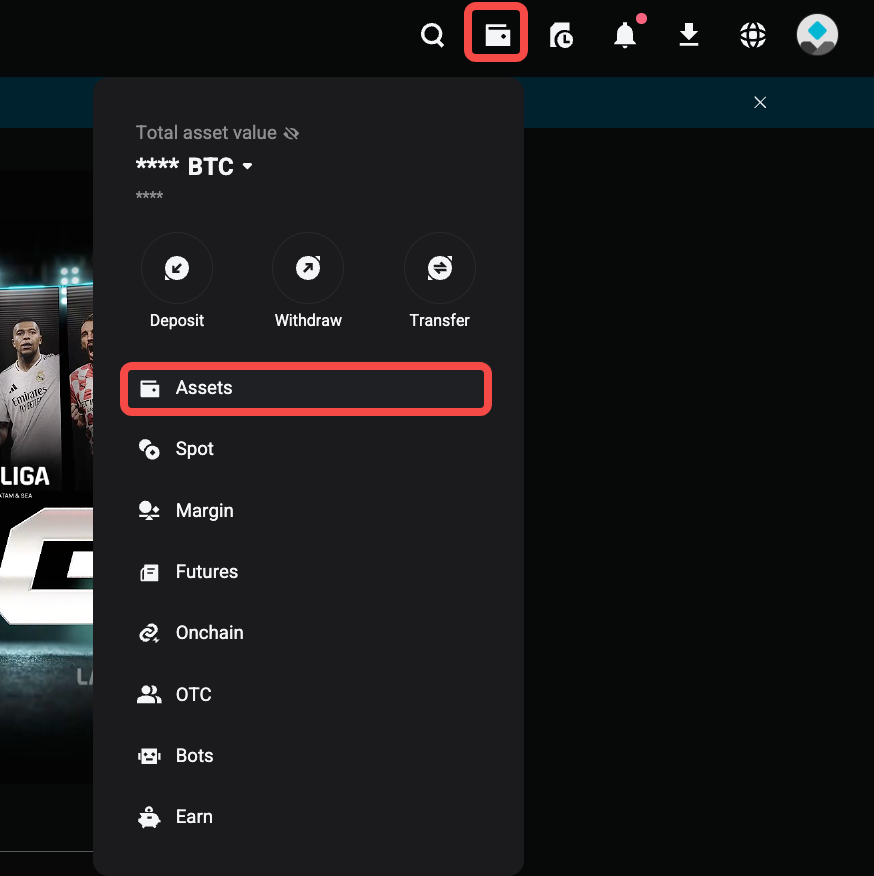
2. Open Assets.
3. Select Upgrade to Unified Trading Account.
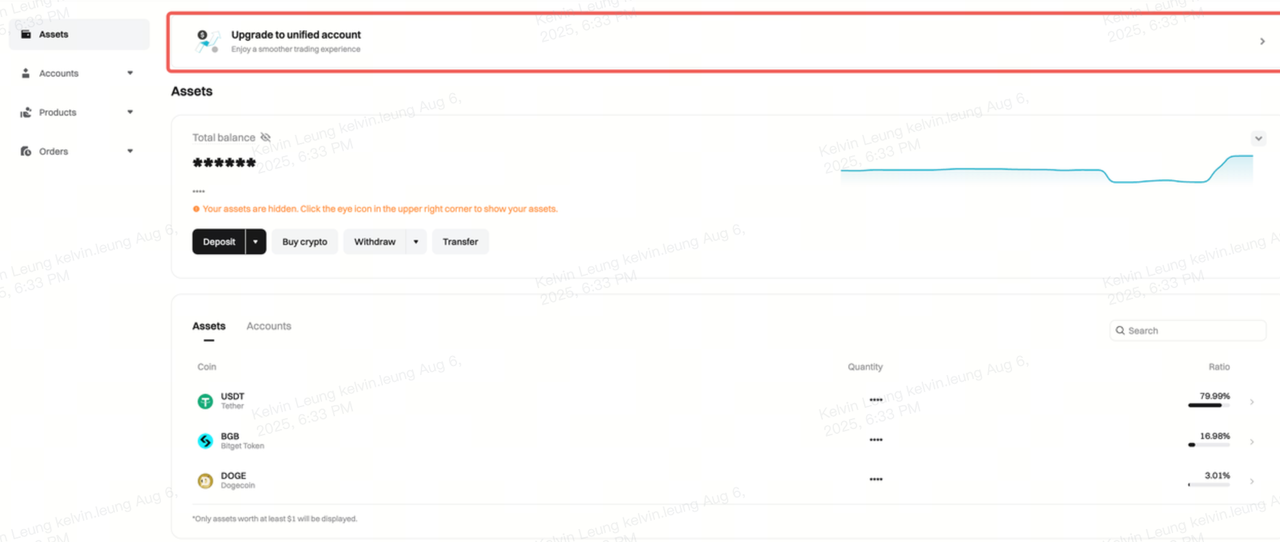
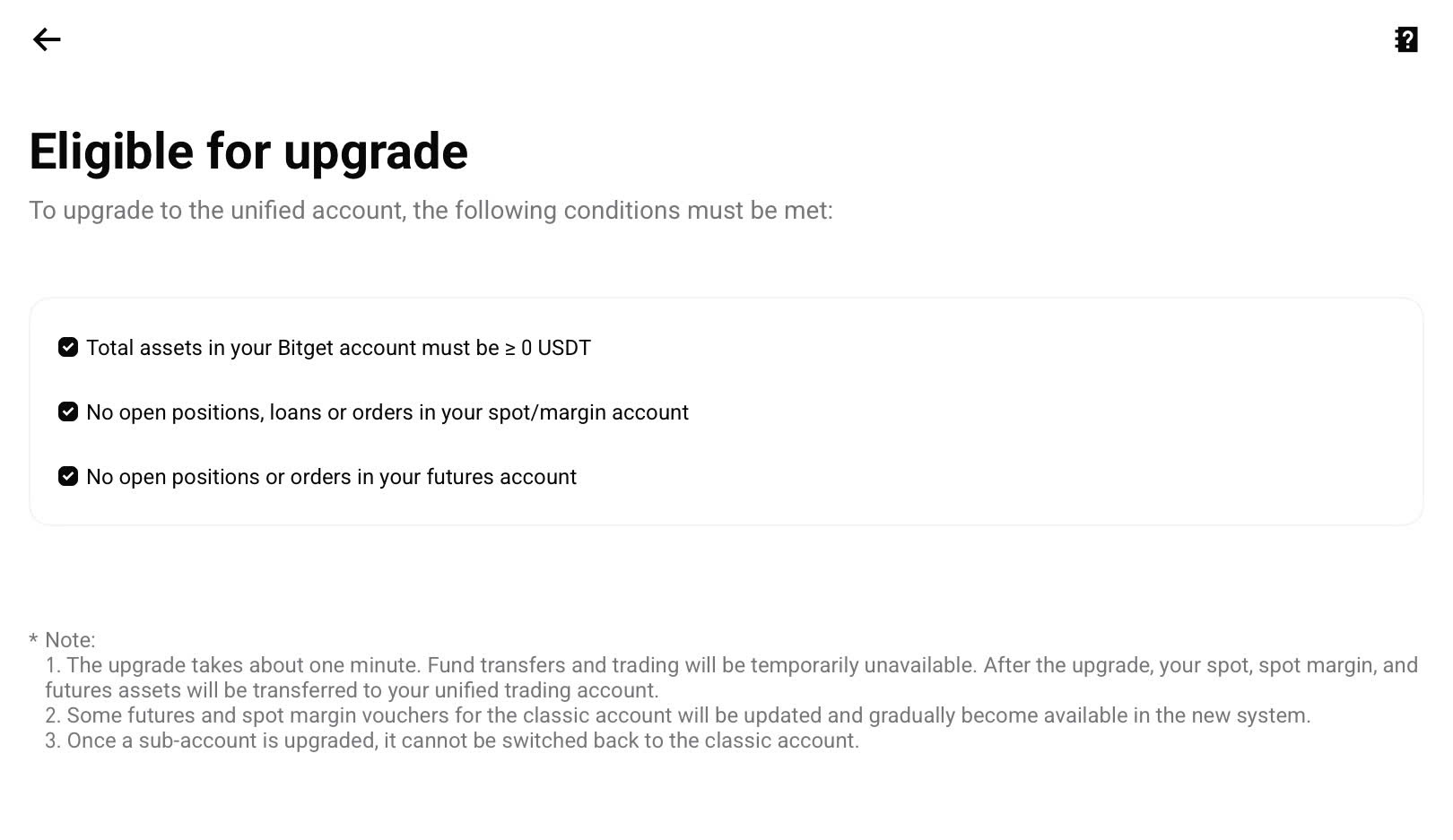
4. Review and complete the displayed requirements.
5. Choose the preferred UTA mode.
6. Confirm the migration.
Requirements Before Upgrading
Before upgrading, users may need to ensure that the account has:
-
No open Spot or Margin orders
-
No outstanding Margin loans
-
No incompatible Spot Margin positions
-
No open Futures orders
-
No unsupported positions or liabilities
-
At least $1,000 in account equity, where required
Users should follow the conditions shown on the live upgrade page, as eligibility requirements may change.
What Happens During the Upgrade?
Eligible balances from Spot, Margin, and Futures accounts are automatically consolidated into UTA.
The migration usually takes around one minute. Trading and fund transfers are temporarily unavailable during the process.
After the upgrade:
-
Supported assets are managed through the unified account.
-
Margin and risk are calculated under the selected UTA mode.
-
Users can access eligible UTA products and collateral features.
-
Position vouchers are no longer available.
Learn more: How to Upgrade to Unified Trading Account?
Can Users Switch Between UTA Modes?
Users can switch between UTA modes through the Spot or Futures trading interface. The available options depend on the products, positions, and collateral currently used in the account.
Switch Modes on the Bitget App
1. Open the Spot or Futures trading page.
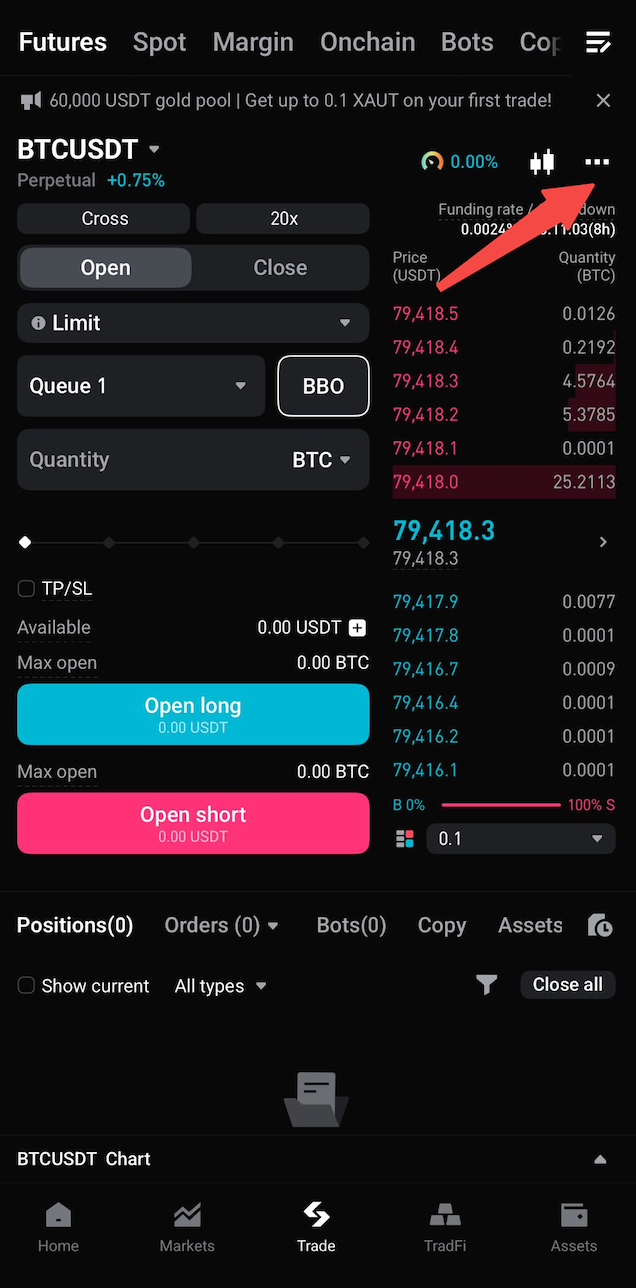
2. Tap More.
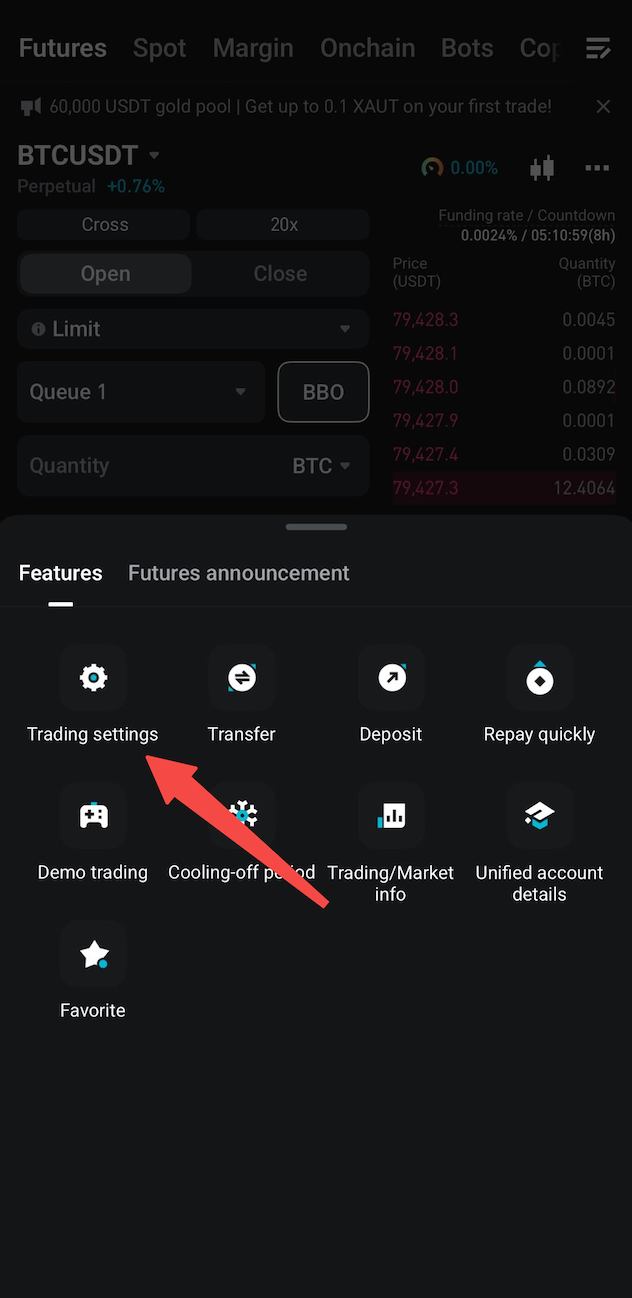
3. Select Trading Settings.
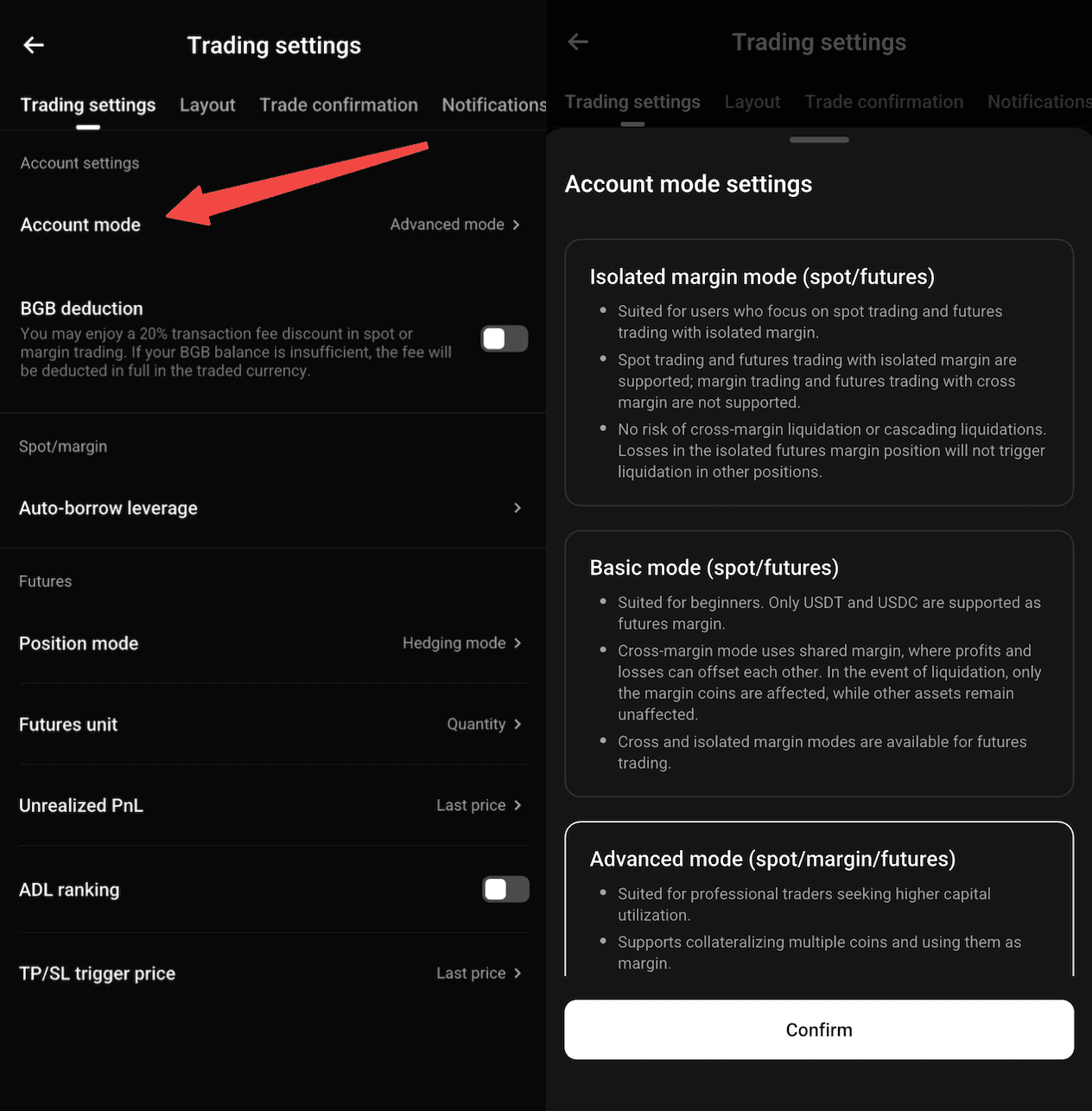
4. Select Account Mode.
5. Choose the preferred UTA mode.
6. Confirm the change.
Switch Modes on the Bitget Website
1. Open the Spot or Futures trading page.
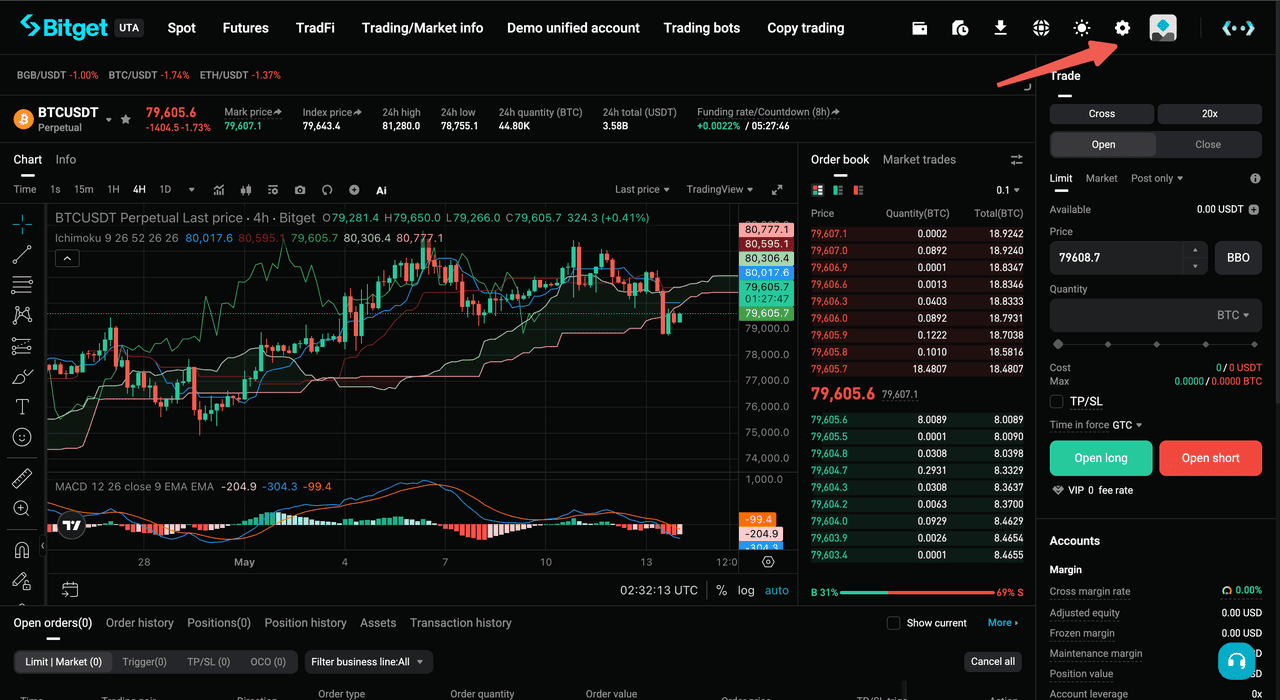
2. Select Settings.
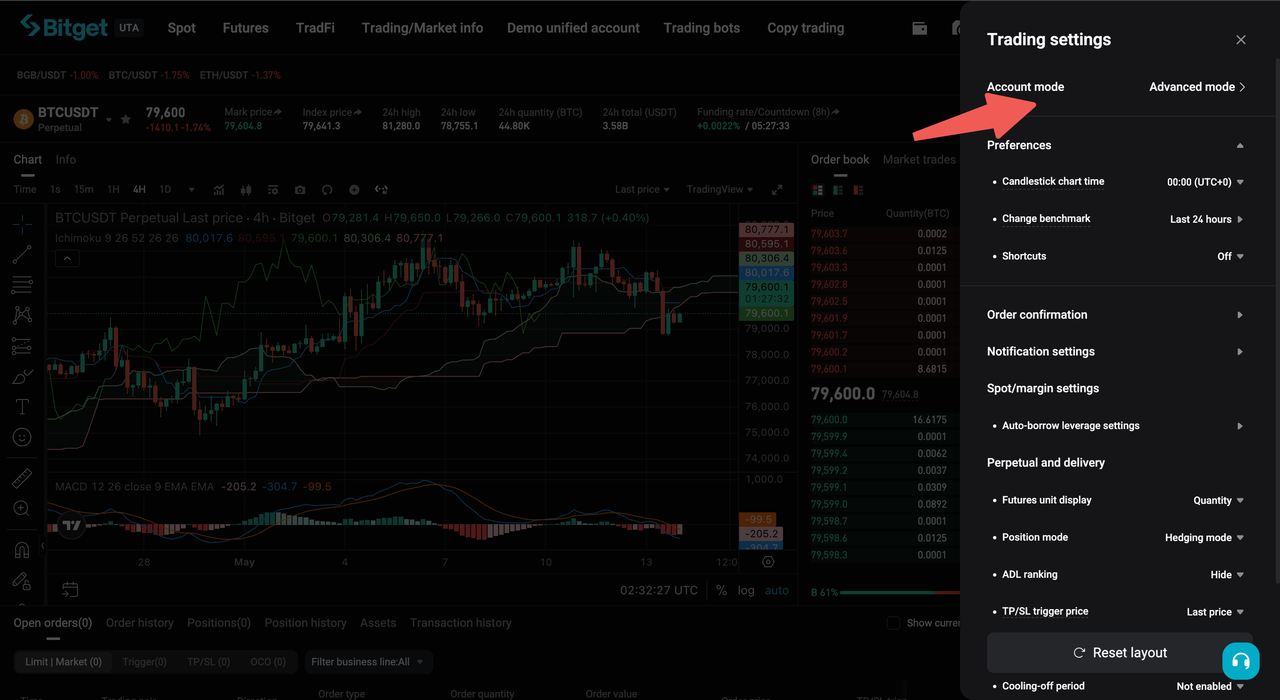
3. Select Account Mode.
4. Choose the preferred mode.
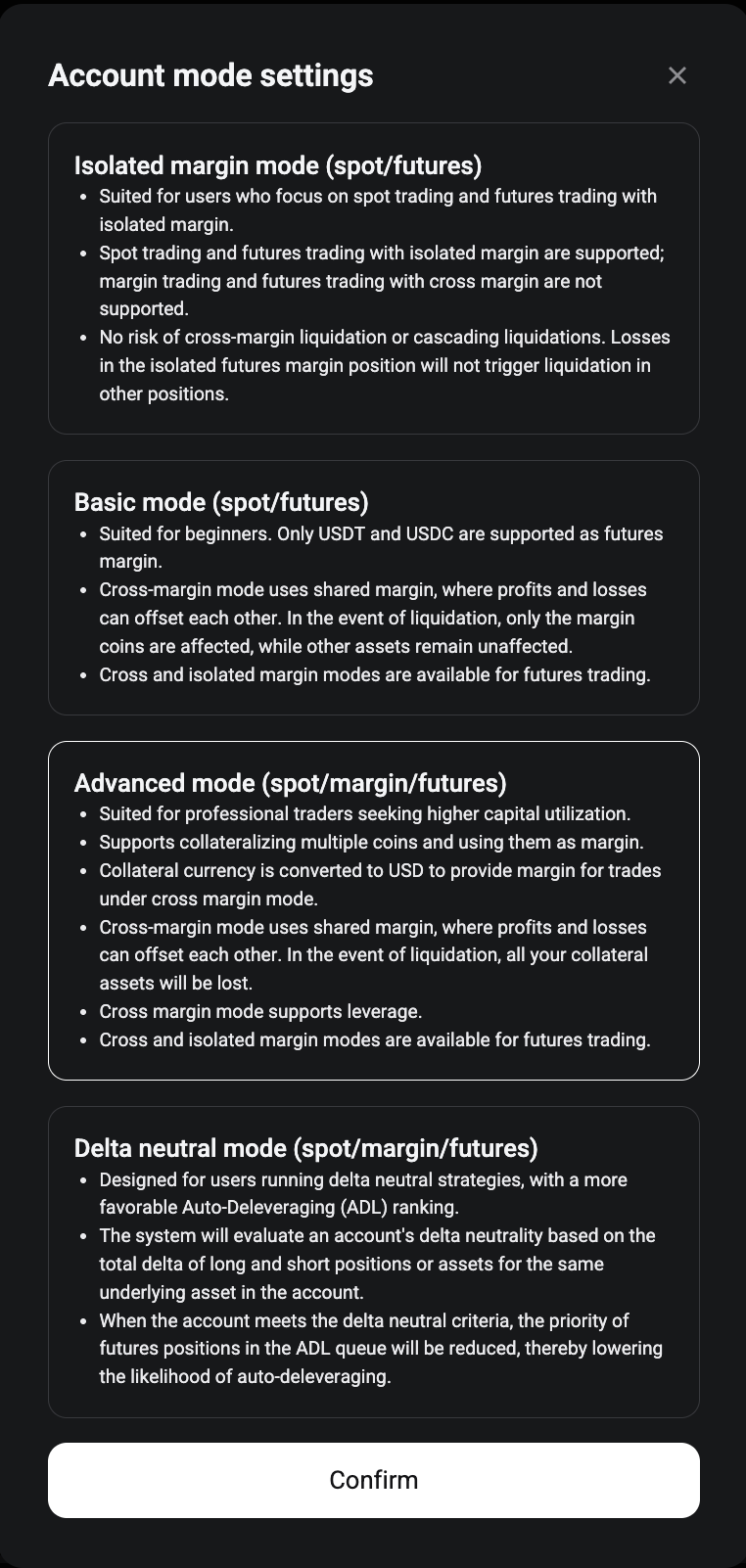
5. Confirm the change.
Before switching, users may need to cancel pending orders, close incompatible positions, or repay outstanding liabilities.
For example:
-
Delta Neutral Mode only supports cross-margin products.
-
Users must close isolated Futures positions and cancel isolated Futures orders before switching to Delta Neutral Mode.
-
Basic Mode only supports USDT and USDC as margin assets.
-
Advanced Mode is required for configurable multi-asset collateral.
-
Some modes may require account eligibility or whitelisting.
Users should review the requirements shown on the mode-switching page before confirming the change.
Learn more: How to Switch Account Modes in Your Unified Trading Account
Can Users Switch Back to a Classic Account?
Main-account users can switch from UTA back to the classic account structure after meeting the required conditions.
Before switching back, the account must have:
-
No open orders
-
No open positions
-
No outstanding debts or liabilities
Once the switch begins, all eligible funds in UTA are automatically transferred to the Spot account. The process usually takes around one minute, during which trading and fund transfers are temporarily unavailable.
Users should also note that the switch is not reversible for sub-accounts. Once a sub-account has been upgraded to UTA, it cannot return to classic mode.
Learn more: How to Switch Back to Classic Account?
Final Thoughts
Bitget Unified Trading Account marks a major step forward in how users manage capital across Spot, Spot Margin, and Futures. By bringing supported products, collateral, PnL, borrowing, and risk into one connected account, UTA helps reduce unnecessary fund transfers and allows more assets to stay active across trading strategies. With four account modes and broad multi-asset collateral support, UTA gives users a more flexible foundation for managing both simple and advanced trading needs.
As trading becomes increasingly multi-asset and strategy-driven, UTA positions Bitget at the center of a more efficient trading experience. Whether users are hedging a portfolio, managing several Futures markets, using eligible assets as collateral, or running delta-neutral strategies, UTA turns one account into a more powerful capital hub. The result is a simpler, faster, and more connected way to trade, built for users who want more from every asset they hold.
One account, more ways to trade. Register on Bitget and unlock a more connected trading experience.
Disclaimer: The opinions expressed in this article are for informational purposes only. This article does not constitute an endorsement of any of the products and services discussed or investment, financial, or trading advice. Qualified professionals should be consulted prior to making financial decisions.
Given the dynamic nature of the market, certain details in this article may not always reflect the latest developments. For any inquiries or feedback, please reach out to us at geo@bitget.com.


- Key Takeaways
- What Is Bitget Unified Trading Account (UTA)?
- How Does Bitget Unified Trading Account (UTA) Work?
- Bitget Unified Trading Account (UTA) vs. Classic Account
- Advantages of Bitget Unified Trading Account (UTA)
- Bitget Unified Trading Account (UTA) Account Modes
- How Margin and Collateral Work in Bitget Unified Trading Account (UTA)
- How Can rTokens Be Used With Bitget Unified Trading Account (UTA)?
- How Does Liquidation Work Under Bitget Unified Trading Account (UTA)?
- Who Is Bitget Unified Trading Account (UTA)? Suitable For?
- How to Upgrade to Bitget Unified Trading Account (UTA)
- Can Users Switch Between UTA Modes?
- Can Users Switch Back to a Classic Account?
- Final Thoughts