
What Is Bitget rToken Auto-Invest? The Simpler Path to Building a U.S. Stock Portfolio
Building a U.S. stock portfolio often starts with a simple plan: invest regularly in companies you believe in, add exposure to major ETFs, and gradually grow your holdings over time. But keeping up with that plan isn't always easy. Stock prices change every day, finding the right time to buy can be difficult, and placing orders manually requires consistent attention.
Bitget is making that process more convenient. On October 27, 2026, the exchange expanded its Spot Auto-Invest feature to support more than 3,000 U.S. stock rTokens and ETFs, allowing users to automate recurring investments using USDT. From individual companies such as NVIDIA, Apple, and Tesla to ETFs tracking major U.S. indices, users can create investment plans based on their preferred assets, amounts, and schedules. Here's how Bitget rToken Auto-Invest works, what makes it useful, and how to get started.
Key Takeaways
-
Bitget rToken Auto-Invest supports 3,000+ U.S. stock rTokens and ETFs following its October 27, 2026 expansion, giving users a broader selection of stock-linked assets for recurring investments.
-
Users can automate purchases using USDT with hourly, daily, weekly, or monthly investment schedules, without having to place every order manually.
-
The feature supports dollar-cost averaging (DCA), allowing users to gradually build positions across different market prices rather than relying on a single entry point.
-
Multiple assets can be included in investment plans, making it easier to allocate funds across supported U.S. stocks and ETFs.
-
Some rTokens have trading-hour restrictions. Scheduled purchases that fall outside eligible trading sessions are skipped and are not automatically made up later.
What Is Bitget rToken Auto-Invest?
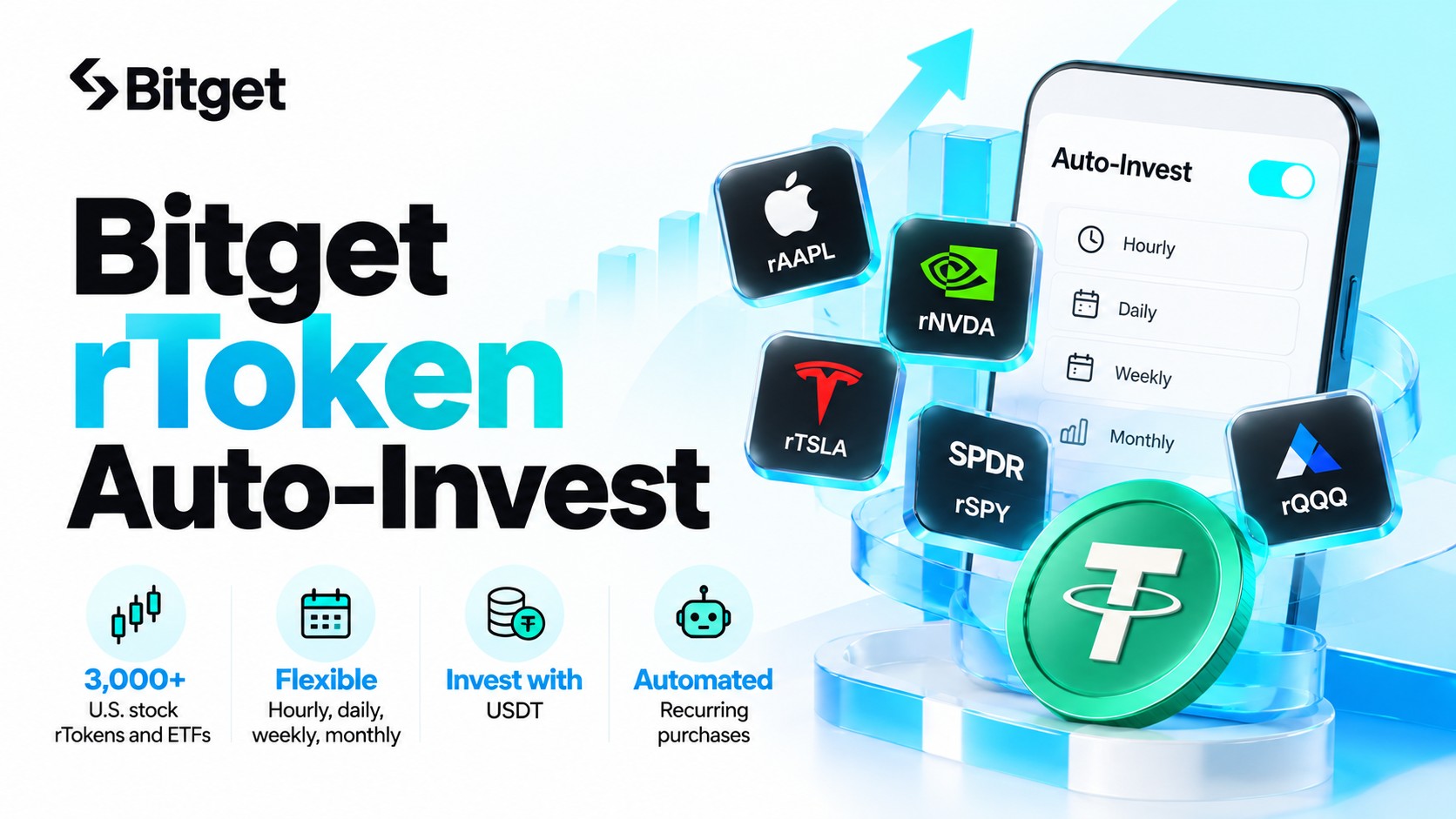
Bitget rToken Auto-Invest is an automated spot investment feature that allows users to purchase supported tokenized U.S. stocks and ETFs at regular intervals using USDT. Instead of placing a new order every time they want to invest, users can choose their assets, set an investment amount and frequency, and let the system handle eligible scheduled purchases.
The feature combines two products within Bitget's ecosystem: rTokens, which provide tokenized exposure to U.S. equities, and Spot Auto-Invest, which automates recurring purchases through a dollar-cost averaging strategy.
What Are Bitget rTokens?
Bitget rTokens are tokenized representations of U.S. stocks and ETFs issued by Reality, an RWA issuance platform strategically backed by Bitget. Launched on June 2, 2026, the product allows eligible users to gain stock-linked exposure directly through Bitget using USDT.
Each rToken is designed to be backed 1:1 by its corresponding underlying security, held through regulated brokerage and custody infrastructure. Reality also uses independent Proof of Reserves verification to support transparency around the underlying holdings.
The naming system is straightforward: the letter "r" is added before the underlying stock or ETF ticker.
For example:
-
rNVDA: NVIDIA
-
rAAPL: Apple
-
rTSLA: Tesla
-
rSPY: SPDR S&P 500 ETF Trust
-
rQQQ: Invesco QQQ Trust
Unlike buying shares directly through a traditional brokerage account, holding an rToken provides tokenized economic exposure rather than direct registered shareholder ownership. Eligible rTokens can reflect dividend distributions and supported corporate actions under the applicable product rules.
Users can learn more about the structure and supported assets through the Bitget rToken platform.
What's New With the 3,000+ rToken Expansion?
Bitget first introduced Spot Auto-Invest for rTokens on June 30, 2026, allowing users to schedule recurring stock-token purchases.
The latest expansion, announced on October 27, 2026, significantly broadens the feature's coverage to more than 3,000 U.S. stock rTokens and ETFs, including all rTokens available for Bitget spot trading.
Users can now choose from a wider range of stock-linked assets and set recurring investments according to their preferred schedules.
| Feature |
Bitget rToken Auto-Invest |
| Supported assets |
3,000+ U.S. stock rTokens and ETFs |
| Investment currency |
USDT |
| Investment frequency |
Hourly, daily, weekly, or monthly |
| Investment strategy |
Dollar-cost averaging |
| Asset selection |
One or multiple eligible assets |
| Purchase execution |
Automatic, subject to trading availability |
| Plan management |
Review, modify, pause, or cancel |
| Bot usage fee |
No additional bot fee; applicable trading fees may apply |
This expansion allows users to explore recurring investments across a much wider selection of U.S. equities and ETFs while managing their plans within the same platform they use for cryptocurrency trading.
What Are the Key Features and Benefits of Bitget rToken Auto-Invest?
The main benefit of rToken Auto-Invest is convenience. Once an investment plan is configured, users no longer need to place every purchase manually. However, its usefulness goes beyond automation, particularly for those looking to build stock-linked portfolios over time.
1. Access 3,000+ U.S. Stock rTokens and ETFs
Bitget's expanded coverage gives users access to a broad selection of tokenized U.S. equities and ETFs through Spot Auto-Invest.
Rather than focusing only on a few well-known technology companies, users can explore different sectors, including technology, finance, healthcare, energy, and consumer businesses, as well as ETFs tracking broader market indices.
For example, someone interested in technology companies might consider recurring purchases of eligible NVIDIA, Apple, and Microsoft rTokens. Another investor looking for broader market exposure could explore ETF-linked products such as rSPY or rQQQ.
The expanded selection also makes it easier to create investment plans around particular sectors or investment themes.
All selections remain subject to the rTokens currently available through Bitget's Auto-Invest interface.
2. Automate Investments With Flexible Schedules
Not everyone wants to invest on the same schedule. Some users prefer small, frequent purchases, while others allocate a portion of their income each month.
Bitget supports four recurring investment frequencies:
-
Hourly: Schedule purchases at hourly intervals.
-
Daily: Invest a fixed amount each day.
-
Weekly: Set recurring purchases on a weekly schedule.
-
Monthly: Allocate funds to selected assets each month.
For example, a user could schedule a 50 USDT investment in an eligible NVIDIA rToken every week. Once the plan is active, Bitget automatically executes the purchases when the asset is available for trading and the account has sufficient funds.
This removes the need to remember each purchase date or manually submit an order.
Users can adjust their plans as their investment goals or financial circumstances change.
3. Build Positions Gradually With Dollar-Cost Averaging
Dollar-cost averaging, or DCA, involves investing a fixed amount at regular intervals regardless of short-term market movements.
Instead of investing an entire amount at one price, users spread purchases across multiple entry points.
When the asset price falls, the same investment amount buys more units. When the price rises, it buys fewer.
This can help users establish a consistent investment routine and reduce the pressure of choosing the perfect entry point.
For example, rather than trying to predict whether Tesla stock will rise or fall next week, a user could allocate a fixed amount to an eligible Tesla rToken each month.
DCA does not eliminate market risk or guarantee a lower average purchase price than investing a lump sum. Its main advantage is creating a structured approach to recurring purchases.
4. Build a Portfolio Across Multiple U.S. Stocks and ETFs
A portfolio doesn't have to consist of a single stock.
Bitget Auto-Invest allows users to create recurring investment strategies involving multiple supported assets, making it easier to distribute allocations across different investments.
For example, a user could combine exposure to individual companies such as NVIDIA and Apple with an ETF tracking the S&P 500.
The allocation can be adjusted to reflect their preferred balance between individual stock exposure and broader index-linked investments.
Users can also create multiple Auto-Invest plans for different assets and manage them separately.
It's worth remembering that holding several assets does not always mean a portfolio is well diversified. For example, the S&P 500 already includes NVIDIA and Apple, so combining those stocks with an S&P 500 ETF increases exposure to companies that are already represented in the index.
5. Manage Investments Without Repeated Manual Orders
Once a plan is running, users can review its execution history, check purchased quantities, and monitor their investment progress.
Bitget also provides controls for adjusting investment settings, pausing plans, or terminating them when necessary.
This is useful for people who want to follow a recurring investment strategy without constantly monitoring stock prices.
Automation reduces the work involved in placing orders, although users should still review their portfolios periodically to ensure their allocations and investment amounts remain appropriate.
How Does Bitget rToken Auto-Invest Work? A Practical Example
To understand how the feature works, consider someone who wants to build a position in NVIDIA over several months.
Instead of purchasing the full amount immediately, the user sets up a recurring investment plan.
Example 1: Investing 100 USDT Monthly in NVIDIA rTokens
Suppose a user invests 100 USDT into rNVDA every month for three months.
The following example uses hypothetical token prices to illustrate how DCA works.
| Month |
Hypothetical rNVDA price |
Investment |
rNVDA purchased |
| Month 1 |
$200 |
100 USDT |
0.5000 |
| Month 2 |
$160 |
100 USDT |
0.6250 |
| Month 3 |
$250 |
100 USDT |
0.4000 |
| Total |
— |
300 USDT |
1.5250 |
After three completed purchases, the user has invested 300 USDT and accumulated 1.525 rNVDA.
The average acquisition cost is approximately $196.72 per rNVDA, excluding trading fees and any execution-price differences.
The example illustrates how a fixed investment amount buys more tokens when prices are lower and fewer when prices are higher.
It also shows why DCA is not a guarantee of profitability. If the market price drops below the average acquisition cost, the position can still have an unrealized loss.
Actual results depend on market prices, fees, trading availability, and whether each scheduled purchase is successfully executed.
Example 2: Building a U.S. Stock and ETF Portfolio With 400 USDT Monthly
Auto-Invest can also be used to build exposure across multiple assets.
Consider a hypothetical monthly investment budget of 400 USDT allocated as follows:
| Asset |
Monthly allocation |
Portfolio weight |
| rSPY — S&P 500 ETF |
200 USDT |
50% |
| rNVDA — NVIDIA |
100 USDT |
25% |
| rAAPL — Apple |
100 USDT |
25% |
| Total |
400 USDT |
100% |
In this example, half the recurring investment goes toward a broad U.S. stock-market ETF, while the remaining half is divided between two individual technology companies.
If the same amounts are successfully invested each month, the user would contribute 4,800 USDT over 12 months, excluding fees.
The actual portfolio value could be higher or lower than that contribution amount depending on market performance.
The allocation is illustrative rather than a recommended investment portfolio. It also has concentrated exposure to large U.S. technology companies because NVIDIA and Apple are already constituents of the S&P 500.
The practical advantage is that the user can plan recurring allocations in advance rather than deciding how much to purchase each month.
How to Set Up Bitget rToken Auto-Invest: Step-by-Step Guide
Creating an rToken Auto-Invest plan on Bitget follows a straightforward process. Users can access the feature through the Bitget website or mobile app, although interface labels may vary slightly by version.
Step 1: Open Spot Auto-Invest on Bitget
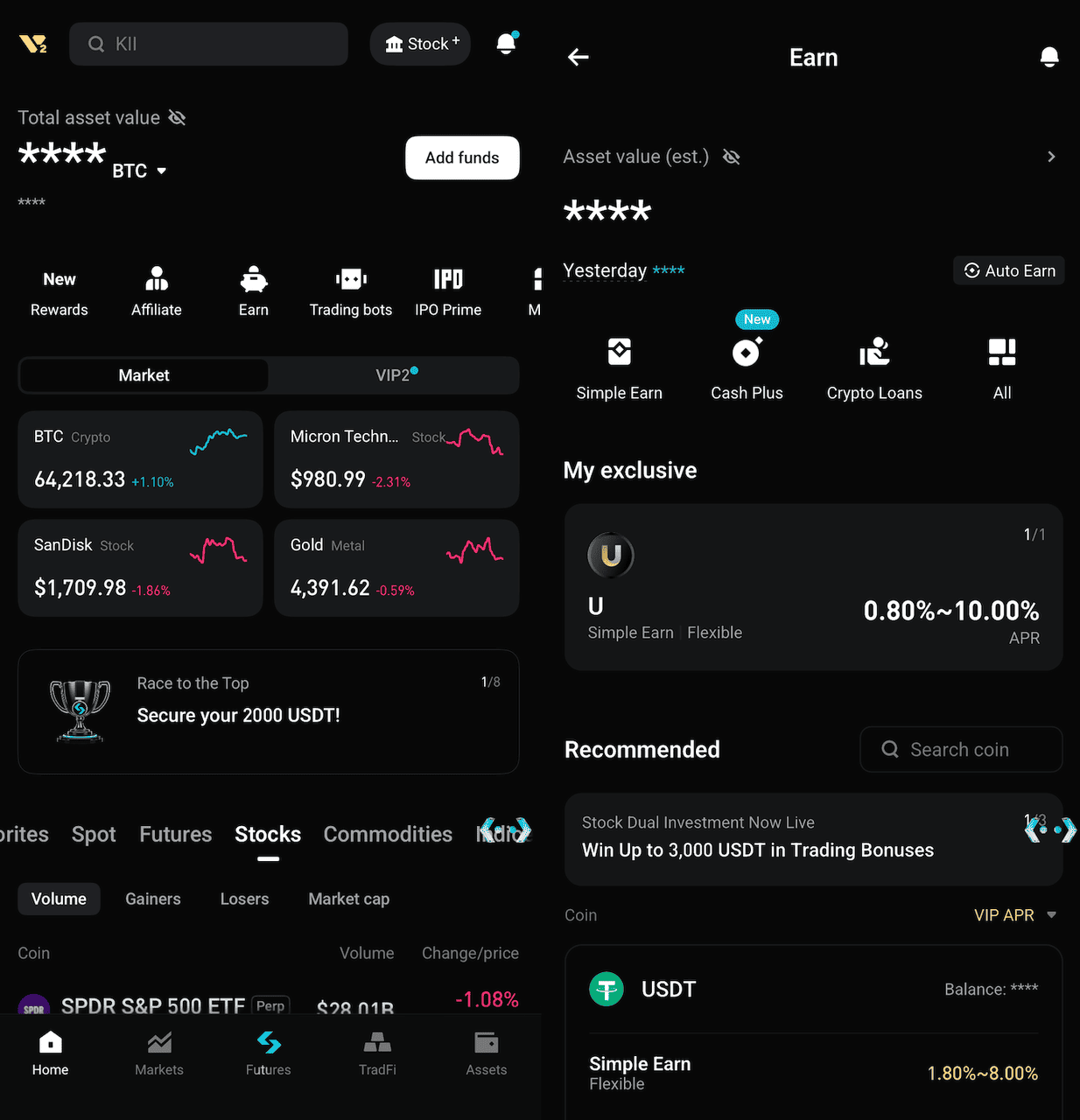
Sign in to your Bitget account and open the trading section.
On the app, navigate to Trade → Trading Bots → Spot Auto-Invest.
On the website, open the Bots section and locate Spot Auto-Invest+.
Make sure your account has completed the required identity verification and has access to the relevant products.
Step 2: Select Your U.S. Stock rTokens and ETFs
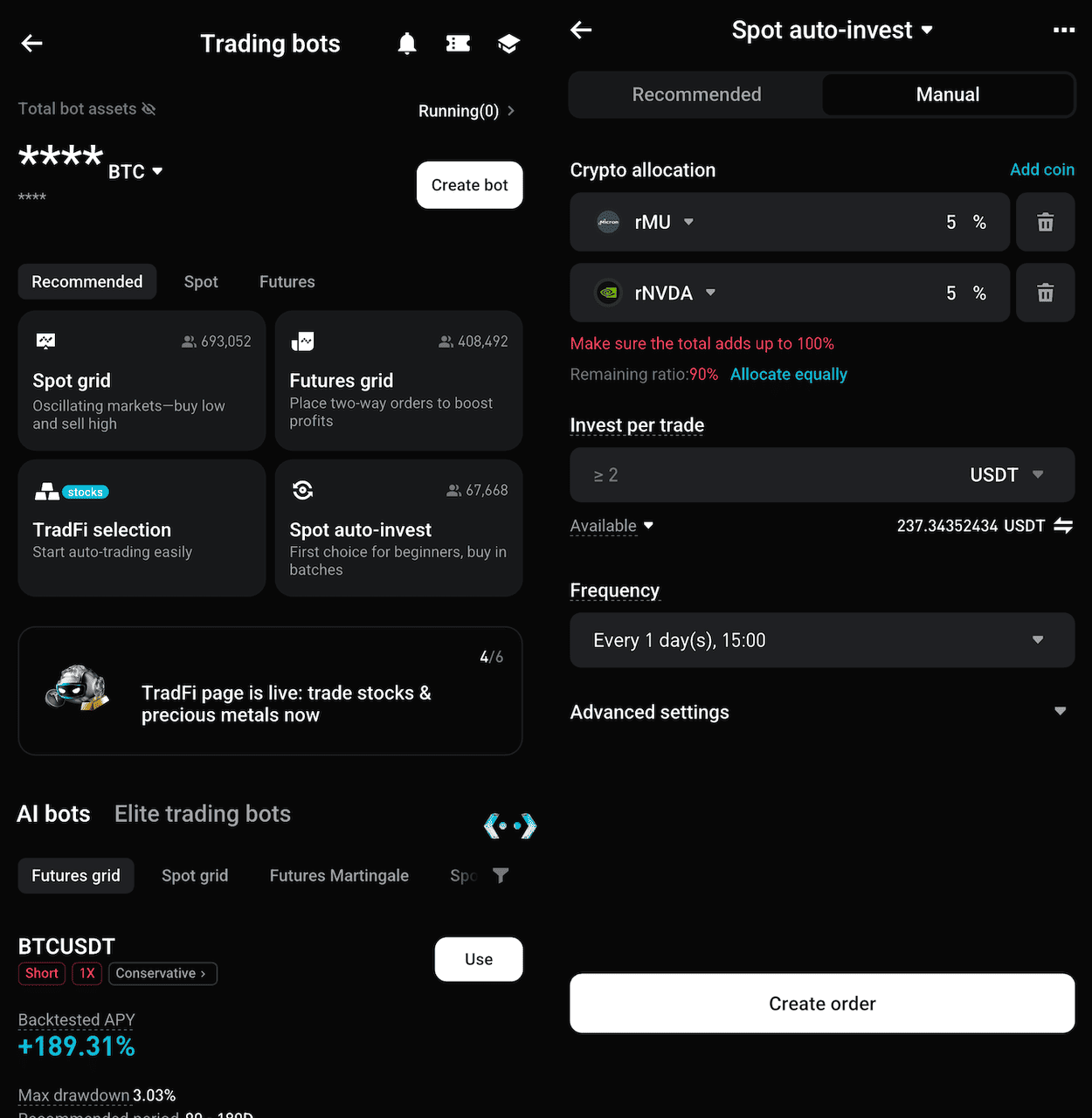
Open the Manual Creation page and select Add Assets.
Search for the U.S. stock rTokens or ETFs you want to include in your plan.
For example, you could search for rNVDA, rAAPL, or rQQQ, provided they are currently supported.
Users can select multiple eligible assets and configure their investment allocations according to the available settings.
Step 3: Set Your Investment Amount and Frequency
Enter the amount of USDT you want to invest and choose a recurring schedule.
Available frequencies include hourly, daily, weekly, and monthly.
For a multi-asset plan, review the allocation assigned to each selected asset.
You should also confirm that your selected funding account has sufficient available USDT to cover scheduled purchases.
Step 4: Review and Activate Your Auto-Invest Plan
Before confirming, review the selected assets, investment amount, schedule, account balance, and any market-hour restrictions shown on the page.
Once the plan is created, Bitget will automatically submit eligible purchases according to the configured settings.
The exact execution time may differ from the scheduled time for certain stock rTokens because of trading-session availability.
Step 5: Monitor and Manage Your Portfolio
After activating the plan, return to the Trading Bots section to review its status and execution history.
Users can monitor completed purchases, check their investment records, and modify or pause their plans using the available controls.
If an investment strategy no longer fits their goals, they can terminate the plan without having to continue placing scheduled purchases.
For additional setup instructions, refer to Bitget's Spot Auto-Invest guide for U.S. stock rTokens.
Can You Auto-Invest in U.S. Stock rTokens 24/7 on Bitget?
Not every stock rToken is available for automatic purchases at every hour of the day.
Although Bitget supports extended and weekend trading for eligible rTokens, some stocks and ETFs can only be traded during their respective market sessions.
This distinction is important when setting up recurring investments. The Auto-Invest system follows several rules for instruments affected by trading-hour restrictions.
If a scheduled purchase falls outside available trading hours, it is skipped. The bot resumes purchasing at the next scheduled investment time when trading is available.
Missed purchases are not automatically made up, and the system does not place duplicate orders to compensate for them.
For example, suppose a user schedules a weekly purchase for Sunday morning, but the selected rToken is unavailable for trading at that time.
The bot will skip that week's purchase. It will not automatically execute the missed order when the market opens on Monday. Instead, it will wait for the next eligible scheduled purchase.
If the plan also contains cryptocurrencies that trade around the clock, those crypto purchases can continue according to their schedules even when a stock rToken purchase is skipped.
Bitget also notes that overnight-session availability and market closures can create differences between expected and actual execution times.
Users should therefore review the trading-hour notices shown during setup, check execution records, and update the Bitget app to the latest version for the relevant notifications.
Bitget rToken Auto-Invest vs. Manual Stock Trading: What's the Difference?
Both Auto-Invest and manual trading allow eligible users to gain exposure to supported rTokens. The main difference is how and when purchases are placed.
| Feature |
Bitget rToken Auto-Invest |
Manual rToken Trading |
| Order placement |
Automatic |
Manual |
| Investment frequency |
Preset schedule |
Whenever the user chooses |
| Investment amount |
Preconfigured |
Selected for each order |
| Entry timing |
Scheduled, subject to availability |
User-controlled |
| Multiple assets |
Supported in eligible plans |
Each order placed manually |
| Ongoing effort |
Less manual involvement |
More active management |
| Main use case |
Recurring accumulation |
Flexible purchase and sale decisions |
| Market risk |
Yes |
Yes |
Auto-Invest may be more convenient for users who prefer a consistent investment routine and don't want to decide when to buy every week or month.
Manual trading provides greater control over individual entry prices and order timing. It may suit users who want to respond to specific market conditions or adjust their positions more frequently.
Neither approach is inherently better. The choice depends on the investor's goals, preferred level of involvement, and risk tolerance.
What Should You Know Before Using Bitget rToken Auto-Invest?
Auto-Invest makes recurring purchases more convenient, but users still need to understand the assets they are purchasing and the conditions under which orders execute.
-
Market volatility: U.S. stocks and ETFs can experience significant price movements. Holding rTokens exposes users to market risk linked to the underlying securities, as well as risks associated with the tokenized product structure.
-
Trading hours: Some assets have restricted trading sessions. If a purchase is scheduled when an instrument is unavailable, the order may be skipped.
-
Account balance: Insufficient USDT can prevent an investment from executing as scheduled. Users should check their funding account regularly.
-
Trading fees: Bitget does not charge an additional fee simply for using the Spot Auto-Invest bot. Applicable spot trading fees and execution costs may still apply. Users should review the current fee schedule for each asset.
-
Tokenized ownership: rTokens are not identical to directly registered shares. Their economic rights, dividend treatment, custody structure, and corporate-action handling follow the relevant product terms.
-
Portfolio concentration: Investing in several stocks or ETFs does not automatically eliminate concentration risk, especially when their underlying holdings overlap.
Auto-Invest can help users follow a consistent purchase schedule, but it does not guarantee returns or protect against losses.
Final Thoughts
Bitget's expansion of Auto-Invest to more than 3,000 U.S. stock rTokens and ETFs gives users a broader way to build stock-linked portfolios through recurring purchases. With USDT settlement, flexible investment schedules, and support for multiple assets, the feature reduces the manual work involved in gradually accumulating exposure to U.S. equities.
For users who prefer a long-term investment approach, rToken Auto-Invest offers a practical way to establish and maintain a recurring investment plan. The important part is choosing suitable assets, setting an affordable investment amount, and understanding how trading availability affects execution.
Ready to explore automated U.S. stock investing? Get started with Bitget rToken Auto-Invest and create a recurring plan using eligible stocks and ETFs. Choose your assets, set your USDT investment amount, and let Bitget handle scheduled purchases when trading is available.
Frequently Asked Questions About Bitget rToken Auto-Invest
1. What is Bitget rToken Auto-Invest?
Bitget rToken Auto-Invest is a Spot Auto-Invest feature that automatically purchases supported tokenized U.S. stocks and ETFs at preset intervals using USDT. Users choose their assets, investment amounts, and schedules, and the system executes eligible recurring orders according to those settings.
2. Can I automatically invest in U.S. stocks and ETFs on Bitget?
Yes. Bitget supports recurring investments in more than 3,000 eligible U.S. stock rTokens and ETFs following its October 27, 2026 expansion. Users can select supported assets and schedule purchases using USDT. These are tokenized stock-linked products rather than directly registered shares.
3. How often can I schedule rToken Auto-Invest purchases?
Bitget supports hourly, daily, weekly, and monthly Auto-Invest schedules. Users can select the frequency that matches their investment preferences. Actual purchases depend on the selected asset's trading availability, available funds, and other execution conditions.
4. Can I use USDT to build a U.S. stock portfolio on Bitget?
Yes. Users can allocate USDT across eligible stock and ETF rTokens through Bitget's Auto-Invest feature. This allows recurring purchases of multiple stock-linked assets without opening a separate traditional U.S. brokerage account, subject to product eligibility and regional requirements.
5. Does Bitget rToken Auto-Invest work on weekends?
It depends on the asset. Some rTokens support weekend trading, while others are restricted by their underlying market schedules. If a scheduled purchase falls outside available trading hours, the bot skips the order and waits until the next eligible scheduled investment time.
6. Can I pause or cancel my Bitget rToken Auto-Invest plan?
Yes. Users can manage their Auto-Invest strategies through Bitget's Trading Bots interface. Depending on the available controls, they can adjust investment parameters, pause a plan, or terminate it. Completed purchases remain subject to the applicable account and product rules.
Disclaimer: This article is for informational and educational purposes only and does not constitute financial or investment advice. Tokenized stocks and ETFs involve market, liquidity, custody, and product-specific risks. Automated investing does not guarantee profits or prevent losses. Users should conduct their own research, review applicable product terms, and assess their risk tolerance before investing.


- Key Takeaways
- What Is Bitget rToken Auto-Invest?
- What Are the Key Features and Benefits of Bitget rToken Auto-Invest?
- How Does Bitget rToken Auto-Invest Work? A Practical Example
- How to Set Up Bitget rToken Auto-Invest: Step-by-Step Guide
- Can You Auto-Invest in U.S. Stock rTokens 24/7 on Bitget?
- Bitget rToken Auto-Invest vs. Manual Stock Trading: What's the Difference?
- What Should You Know Before Using Bitget rToken Auto-Invest?
- Final Thoughts
- Frequently Asked Questions About Bitget rToken Auto-Invest