What Is Bitget CFD Demo Trading? Benefits, Key Features and How to Get Started
CFD trading allows users to gain exposure to financial markets without owning the underlying assets. Before placing a trade, however, it is important to understand how order sizes, leverage, margin, and trading costs affect a position.
On October 12, 2026, Bitget announced the launch of its CFD demo account, giving users access to 10,000 USDT in virtual funds and real-time market data. Available on the Bitget website and app, the feature provides a practical way to learn the trading process and test strategies without committing real capital.
This guide explains how Bitget CFD Demo Trading works, its key benefits and features, and how to get started. It also covers the differences between demo and live trading, helping users understand what to expect before moving to a funded account.
Key Takeaways
-
Launched on October 12, 2026, Bitget CFD Demo Trading offers a practice environment on the website and app.
-
Start with 10,000 USDT in virtual funds and adjust the balance to suit your practice needs.
-
Explore forex, precious metals, commodities, and indices using real-time market data.
-
Practice with ECN and zero-fee modes, while keeping demo activity separate from live trading.
-
Understand the limitations: demo performance does not guarantee live results, and some leverage settings differ.
What Is Bitget CFD Demo Trading?
Bitget CFD Demo Trading is a practice environment where users trade contracts for difference with virtual funds instead of real money. It lets users explore price movements and trading mechanics before committing capital.
A contract for difference, or CFD, provides exposure to changes in an underlying asset’s price without requiring ownership of that asset. Traders can take a long position when expecting prices to rise or a short position when expecting them to fall.
For example, someone interested in gold could use the demo to practice opening and closing a gold CFD position. The exercise helps them understand how price changes affect the position, without buying physical gold or placing real funds at risk.
Users can access Bitget CFD Demo Trading through the website or app, practice with real-time market quotes, and test strategies through API integration. The demo account is suitable for beginners learning CFD trading and experienced traders exploring new strategies.
Please note that demo balances and profits are virtual. They cannot be withdrawn or converted into live trading funds.
What Are the Benefits of Bitget CFD Demo Trading?
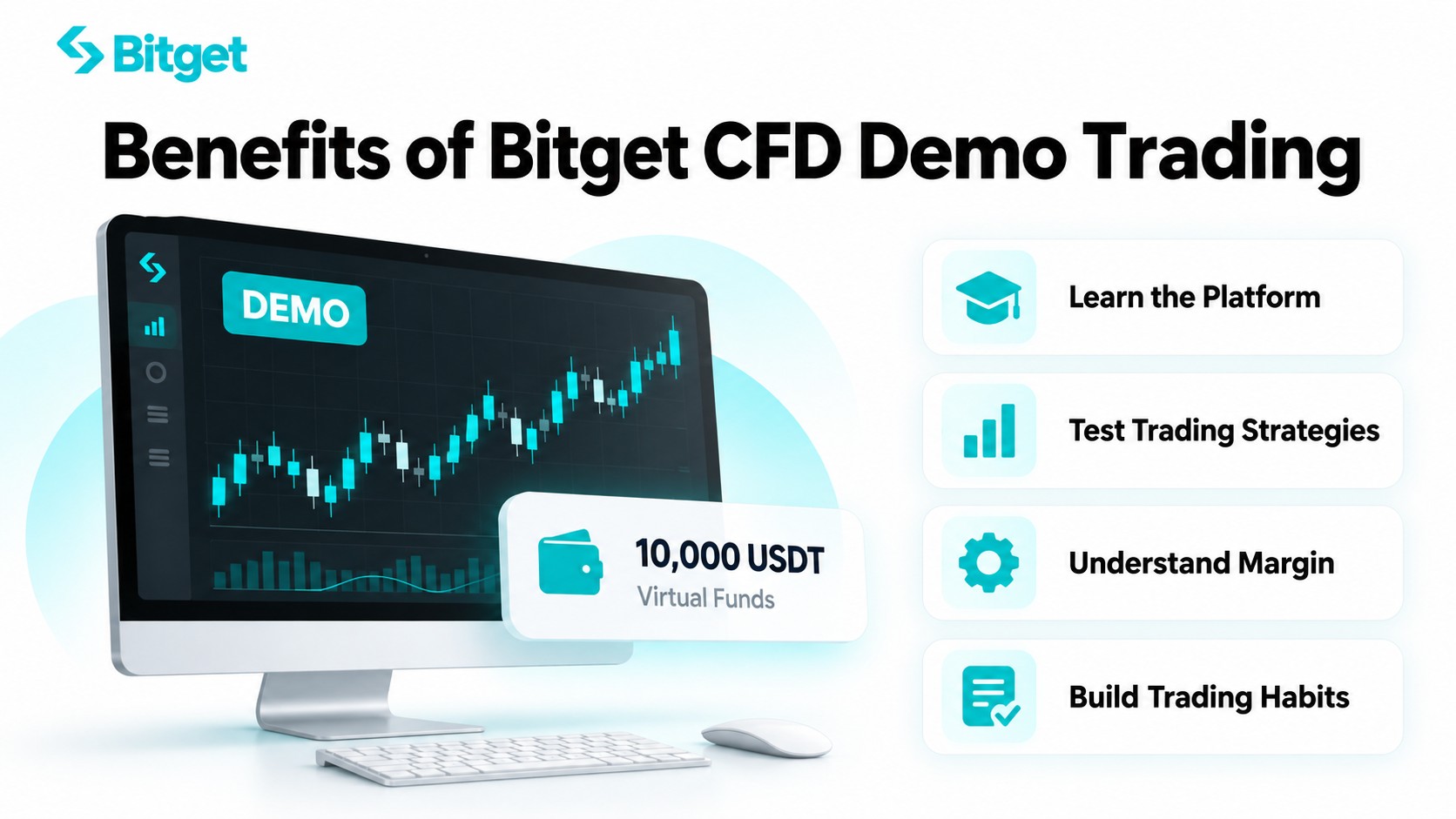
1. Learn the Platform Before Committing Capital
An unfamiliar trading interface can make a simple order difficult to navigate. A demo account gives users time to locate the controls, understand order details, and practice managing positions.
For beginners, an initial practice session can focus on placing, monitoring, and closing a position correctly. This helps establish familiarity with the trading process before evaluating more complex strategies.
2. Test Trading Ideas With a Clear Process
A trading idea becomes easier to evaluate when its rules are defined in advance. You might decide to enter after a breakout, exit if the price returns below a specified level, and keep position sizes consistent.
Recording several trades can help reveal whether you followed those rules. It also makes it easier to distinguish a problem with the strategy from a mistake in execution. A short winning streak alone is not enough to establish that an approach works.
3. Understand Position Size and Margin
A small price movement can have a substantial effect on a leveraged position. Practice provides a way to observe that relationship before real money is involved.
Consider a simplified example of a position with 1,000 USDT in notional exposure. A 1% favorable movement would produce approximately 10 USDT in profit before costs; an equivalent unfavorable movement would produce a similar loss. The effect relative to the margin depends on the leverage used.
At an illustrative 10x leverage, that 1,000 USDT position would require approximately 100 USDT in initial margin. A 10 USDT gain or loss would therefore equal 10% of that margin. This illustrates why a modest market movement can have a much larger percentage impact on the funds supporting a position.
Margin is the collateral required to support a position, not a fee or a guaranteed maximum loss. The actual margin requirement depends on the instrument and applicable account rules.
This example is illustrative and excludes spreads, commissions, financing, slippage, and liquidation effects.
4. Build Consistent Trading Habits
Practice is most useful when it reflects decisions you could realistically make in live trading. That includes using a sensible balance, checking costs, and deciding on an exit before entering.
These habits give each session a purpose. Instead of asking only whether a trade made money, you can assess whether its size, timing, and exit matched your plan.
What Are the Key Features of Bitget CFD Demo Trading?
1. Adjustable Virtual Funds
The starting balance is 10,000 USDT. Users can increase or reduce it through Adjust demo trading funds, with a documented default maximum addition of 10,000 USDT.
Using a realistic practice balance makes it easier to assess position sizes. A large virtual balance can otherwise hide how demanding a trade would be for a smaller account.
2. Multiple Markets and Real-Time Quotes
The demo covers forex, precious metals, commodities, and indices. Bitget’s launch announcement also includes crypto CFDs. The current instrument list should be checked in the trading interface.
Access to different markets lets users compare how instruments behave. Start with a manageable selection so that each trade has a clear purpose.
For example, a user studying currencies might follow how a currency pair responds to economic announcements. Someone interested in precious metals could observe gold around major market events. In either case, the aim is to connect price behavior with a defined trading plan, rather than opening positions simply because a market is moving.
3. ECN and Zero-Fee Trading Modes
Both modes are available in the demo. Bitget’s zero-fee mode guide explains the underlying pricing differences:
| Trading Mode |
Pricing Structure |
| ECN |
Raw-market spreads plus a separate trading commission |
| Zero-fee |
No separate trading commission; a markup is included in the spread |
Zero-fee does not mean zero trading costs. The spread, or difference between buy and sell quotes, remains relevant.
Suppose an instrument has a buy quote of 100.05 and a sell quote of 100.00. Buying and immediately selling at those unchanged quotes would create a 0.05 price difference per unit, before any separate charges. This simplified example shows why the market must move favorably enough to cover execution costs before a position becomes profitable.
When comparing the modes, consider the combined effect of spreads and commissions on the same trade size. A mode without a separate commission is not automatically cheaper for every instrument or strategy.
Live CFD positions may also incur overnight financing charges, known as swaps. Rates depend on the instrument and holding conditions.
Review the CFD fee documentation and the specifications shown in the interface when assessing costs.
4. Order and Position Management
The demo supports pending orders, order cancellation, preset take-profit and stop-loss levels, and partial, full, or one-click position closing.
These controls help users practice more than the initial entry. For example, closing part of a position reduces exposure while keeping the remainder open. Learning how to manage an existing trade is just as useful as learning how to place one.
Take-profit and stop-loss settings serve different purposes. A take-profit instruction targets an exit after a favorable move, while a stop-loss instruction is intended to limit losses after an unfavorable move. In live markets, execution at the exact specified price is not guaranteed, especially during rapid price changes.
5. Risk Notifications and Separate Accounts
Demo and live activity operate independently. Demo trades do not change live balances or positions.
The demo also uses the same liquidation risk ratio as live trading, with email, push, and site alerts. Dynamic leverage can differ, and special-period leverage adjustments are unsupported. Use the leverage displayed on the demo page.
For product rules, see the Bitget CFD demo account user guide.
How to Get Started With Bitget CFD Demo Trading
Step 1: Register and Complete CFD Account Setup
Create or log in to your Bitget account, complete CFD self-directed account registration, and accept the relevant agreement. The demo requires no additional KYC/KYB, password, or 2FA setup. Supported subaccounts have the same demo functionality.
This refers to the additional requirements for the demo itself. Users still need to meet the prerequisites for their Bitget and CFD accounts. Creating a CFD account does not mean you need to fund a live trade before practicing.
Step 2: Open the Demo Trading Interface
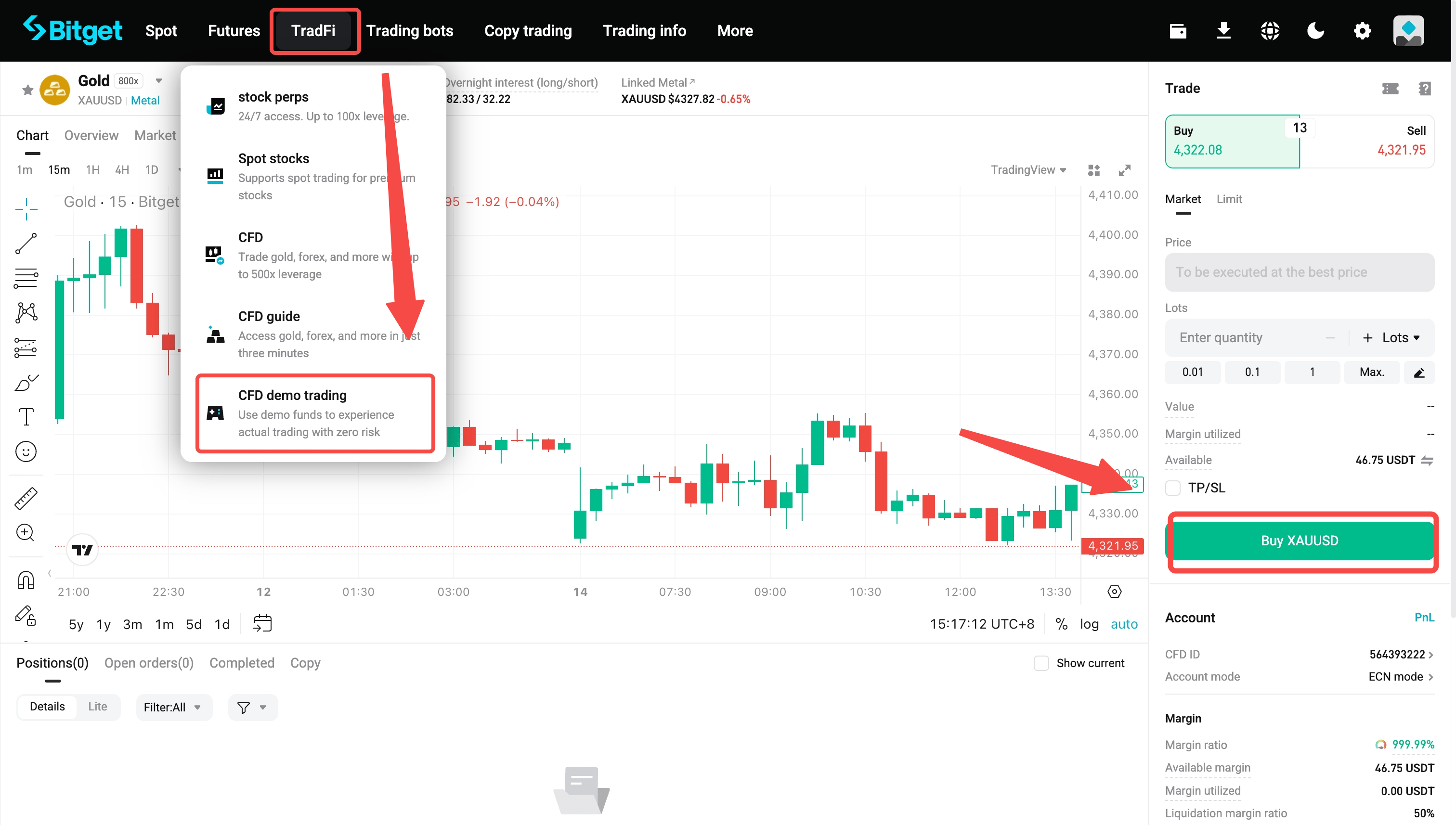
| Platform |
Access Route |
| Website |
CFD trading page → TradFi → CFD demo trading |
| App |
CFD trading page → three-dot menu → Demo trading |
App users need version 2.94.0 or later. Confirm that the demo label is visible before placing an order.
Step 3: Select an Instrument and Trading Mode
Choose a market and select ECN or zero-fee mode. Review the available quotes and contract specifications.
Before entering a trade, check the required margin and displayed leverage. Make sure the proposed exposure matches the size you intended.
CFD trade sizes are commonly expressed in lots. One lot does not represent the same underlying quantity across all instruments, so a familiar-looking number can create very different exposure in another market. Review the contract size rather than assuming that equal lot sizes mean equal risk.
Step 4: Set Your Trading Parameters
Choose the trading direction, volume, order type, and any required entry price. Add take-profit and stop-loss settings where appropriate.
-
Buy/Long: Used when you expect the instrument’s price to rise.
-
Sell/Short: Used when you expect the instrument’s price to fall.
-
Market order: Seeks execution at the available market price.
-
Pending order: Waits for its specified price conditions, subject to the selected order type.
Check the final order details, particularly the direction and size. An incorrect quantity can change the position’s exposure substantially.
Before confirming, review the reason for entering, the planned exit conditions, and the account’s remaining available margin. These checks help ensure that the order matches the intended trading plan.
Step 5: Monitor, Close, and Review
Observe the position as prices change, then use the available controls to close it according to your plan.
Keep a short record of the entry reason, intended exit, outcome, and any execution mistakes. This creates a more useful learning record than a balance figure alone.
For additional setup instructions, see How to Activate a CFD Demo Account.
How Long Does a Bitget CFD Demo Account Last?
A demo account is valid for 30 days. At expiry, pending orders are canceled, positions are closed, and the account is archived. Users can reactivate it and receive new virtual funds without additional identity verification.
Review any practice positions before expiry if you want to record their results. Reactivating an account should not replace reviewing what you learned during the previous session.
How Does Demo Trading Differ From Live Trading?
Demo practice is useful preparation, but it cannot guarantee the same outcomes when real capital is involved.
| Area |
What Users Should Understand |
| Funds |
Demo balances are virtual; live trading exposes real capital to losses. |
| Execution |
Live results can differ because of liquidity, slippage, volatility, and trading costs. |
| Decision-making |
Real gains and losses can change how users respond to market movements. |
There are also feature restrictions. The demo lacks the PnL analysis module, its volume does not count toward promotions or affiliate rebates, and shared position posters retain demo labels.
The practical lesson is to evaluate your process alongside your results. A profitable practice trade may still involve an unsuitable position size or an exit decision you would struggle to follow with real money.
Tips for Making the Most of CFD Demo Trading
A demo account is most useful when practice follows a clear plan. Applying consistent rules makes it easier to evaluate decisions and identify areas that need further attention.
1. Use a Realistic Practice Balance
Set the virtual balance close to the amount you would realistically consider allocating to CFD trading. This helps keep position sizes and margin usage relevant to your circumstances.
For example, practicing with a much larger balance than you intend to use can make a substantial loss appear insignificant. A realistic balance provides a clearer view of how individual trades affect the account.
2. Start With a Small Number of Instruments
Focus on one or two instruments before exploring additional markets. This gives you time to understand their contract specifications, trading sessions, spreads, and typical price behavior.
When switching instruments, review the contract size and margin requirements again. The same number of lots can represent very different exposure across markets.
3. Define the Trade Before Placing the Order
Identify your entry reason, position size, and intended exit before opening a position. Consider both a favorable outcome and the price movement that would invalidate your view.
Take-profit and stop-loss settings can help put that plan into practice. They should be considered alongside position sizing, since an exit level alone does not determine how much exposure a trade creates.
4. Include Trading Costs in Your Review
Assess results after considering spreads, commissions, and any applicable overnight financing. Small costs can become more significant when trades are frequent or positions remain open for longer periods.
When comparing ECN and zero-fee modes, use similar instruments and trade sizes where possible. This makes the effect of each pricing structure easier to understand.
5. Keep a Simple Trading Journal
Record the instrument, direction, size, entry reason, exit, and outcome of each practice trade. Add a short note on whether you followed the original plan.
Over time, this record can help identify recurring issues, such as entering without a clear reason, changing exit levels, or using inconsistent position sizes. Reviewing the decision behind a trade is often more useful than looking at profit or loss alone.
6. Evaluate Consistency Before Moving to Live Trading
A few profitable demo trades do not establish that a strategy will remain profitable. Review how the approach performs across multiple trades and different market conditions, including unfavorable periods.
Before considering live trading, make sure you understand order execution, margin requirements, trading costs, and liquidation risk. Demo practice can improve familiarity, but committing real funds introduces financial and emotional pressures that virtual trading cannot fully reproduce.
Final Thoughts
Bitget CFD Demo Trading provides a practical introduction to CFDs by combining virtual funds, real-time market prices, and a range of order-management tools. Beginners can use it to learn how trades are placed and managed, while experienced users can explore instruments, compare pricing modes, and test trading ideas. Its value extends beyond learning the interface: it also creates an opportunity to understand how position size, margin, and costs interact before real capital is involved.
Making that practice useful requires a consistent approach. A realistic balance, defined entry and exit rules, and regular reviews can help turn individual trades into a clearer understanding of the process. Demo results should always be considered alongside the limitations of simulated trading, particularly differences in execution and the pressure of managing real money. The goal is to approach each trading decision with greater understanding, including knowing when a trade does not fit your plan.
Frequently Asked Questions About Bitget CFD Demo Trading
1. Is Bitget CFD Demo Trading Free to Use?
Yes. Users practice with virtual funds without depositing real money into the demo. Trading modes still let them explore different pricing structures.
2. How Much Virtual Money Do I Receive?
The initial balance is 10,000 USDT. Users can increase or decrease it through Adjust demo trading funds. The documented default maximum addition is 10,000 USDT, and these funds remain available only for practice.
3. Can I Withdraw Demo Funds or Profits?
No. They are virtual and cannot be withdrawn, transferred, or used for live trading.
4. Do I Need to Complete KYC Again?
No additional KYC/KYB is required for demo activation after the prerequisite CFD account registration. This does not remove any verification or eligibility requirements that apply to opening the underlying account.
5. What Happens After the 30-Day Validity Period?
The account is archived after its orders are canceled and positions closed. Users can reactivate it and receive new demo funds. Expiration closes existing positions, so it should not be treated as a pause in an ongoing trade.
Ready to explore CFD trading? Sign up on Bitget and start practicing with virtual funds.
Disclaimer: This article is for educational purposes only and does not constitute investment advice. CFDs involve leverage and a high risk of loss. Demo results do not guarantee live performance. Information is current as of this writing, and is subject to change.


- Key Takeaways
- What Is Bitget CFD Demo Trading?
- What Are the Benefits of Bitget CFD Demo Trading?
- What Are the Key Features of Bitget CFD Demo Trading?
- How to Get Started With Bitget CFD Demo Trading
- How Long Does a Bitget CFD Demo Account Last?
- How Does Demo Trading Differ From Live Trading?
- Tips for Making the Most of CFD Demo Trading
- Final Thoughts
- Frequently Asked Questions About Bitget CFD Demo Trading